Conversational AI for Appointment Booking
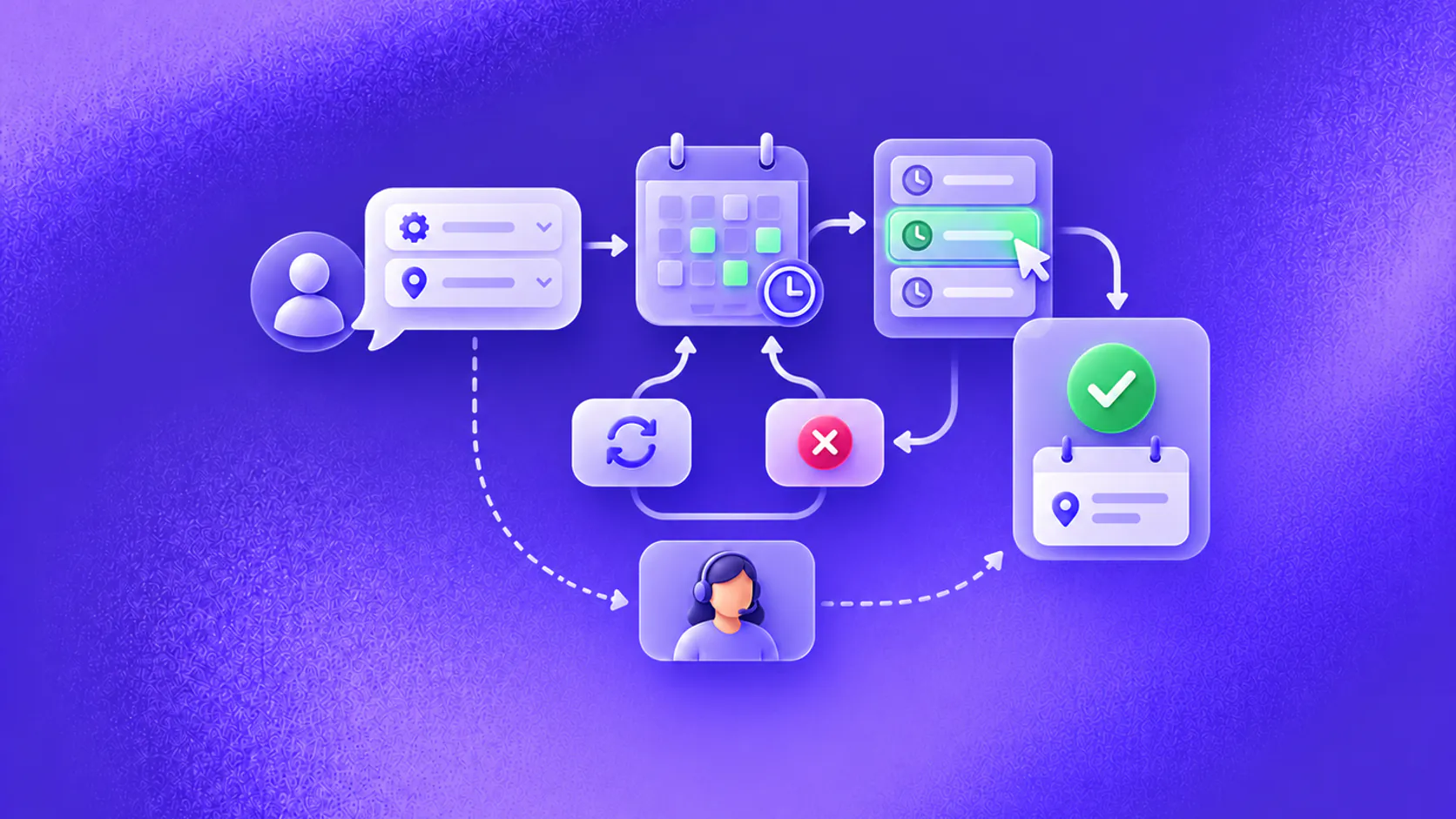
Conversational AI for appointment booking collects the service, location, availability and contact details needed to offer valid slots, create a booking and confirm the result. It should also manage changes, exceptions, reminders and human handoff without claiming an appointment before the calendar confirms it.
Key takeaways
- A booking is complete only after the calendar or scheduling system confirms it.
- Collect service, location, duration and eligibility details before showing slots.
- Design rescheduling, cancellation, unavailable-calendar and special-request paths with the main flow.
- Keep reminders and follow-ups tied to the current booking state so outdated messages are not sent.
What is conversational AI for appointment booking?
Conversational AI for appointment booking lets someone request, choose, change or cancel a time through ordinary language. The system gathers the details that affect scheduling, checks a connected source of availability and records the selected appointment.
The conversation is only the interface. The booking system remains the authority. A slot shown to the customer is an offer; a slot submitted is a request; a slot accepted by the calendar is a confirmed appointment. Reliable automation keeps those states separate.
This matters when several people can choose the same time, when services have different durations or when a location has specific hours. Conversational AI for appointment booking should never invent availability or announce success before the scheduling tool returns it.
Related must-read articles
Which details are needed before showing times?
The workflow should collect only information that affects the booking or prepares the service. Common inputs include:
- Appointment type or service;
- Preferred location or delivery mode;
- Required staff, resource or language when relevant;
- Date or time preferences;
- Duration and eligibility rules;
- Contact details and communication consent;
- An existing booking reference for changes.
Ask questions progressively. If the customer says, “I need a product demo next Tuesday afternoon,” the assistant already has the service, day and time range. It should not ask for them again.
For a regulated or clinical service, keep administrative scheduling separate from professional assessment. A booking assistant may collect the service requested and route special circumstances, but it should not diagnose, recommend treatment or determine urgency unless an appropriately governed system and qualified review support that behavior.
How does the booking workflow work?
A complete conversational AI for appointment booking flow usually follows seven steps:
- Identify whether the person wants to book, reschedule, cancel or check an appointment.
- Collect the minimum details required for the requested action.
- Check eligibility, service rules and valid availability.
- Offer a small number of current options.
- Confirm the customer’s selection and any important conditions.
- Submit the action to the scheduling system and read its result.
- Send a confirmation or route the exception with context.
Consider a hypothetical home-repair business. A customer asks for an air-conditioner service on Saturday morning. The assistant collects the postcode and unit type, verifies that the service is available in that area, checks technician slots and offers two times. After the customer selects 10:30, the scheduling system returns a booking reference. Only then does the assistant confirm the appointment.
If the slot disappears before submission, the assistant apologises, refreshes availability and offers another valid option. It does not silently place the customer at a different time.
How should rescheduling and cancellation work?
Changes are not secondary edge cases. They are part of the appointment lifecycle and should be designed with the first booking.
The system needs to locate the correct booking, follow the business’s verification process and show any relevant cancellation or change conditions from an approved source. After the action, it should return the updated state and reference.
The booking assistant should handle ambiguous requests carefully. “Move my appointment to Friday” is incomplete when several Friday slots exist. “Cancel the later one” is unsafe when the person has two appointments and the system cannot determine which one they mean.
If a connected tool is unavailable, preserve the request without pretending the change occurred. Create a staff task or handoff with the booking reference and requested change.
How do reminders and follow-ups stay accurate?
Reminders should read the current appointment state rather than rely on an old campaign list. A rescheduled appointment must not trigger reminders for its previous time. A cancelled appointment should leave the reminder sequence.
Useful messages can include confirmation, preparation instructions from an approved source, a reminder, a simple change link and post-appointment follow-up. The timing and channel should reflect consent, local requirements and the nature of the service.
The follow-up and aftercare use case connects scheduled messages with customer context. For cross-channel delivery, review the channel options and their specific rules.
The omnichannel conversational AI guide covers continuity when a request starts on one channel and the confirmation or change arrives on another. For longer-term reminders and recovery, see conversational AI for customer retention.
What exceptions need a human owner?
Design an owner for cases such as:
- No suitable availability;
- An unsupported service or location;
- Special accessibility or resource needs;
- A failed calendar or CRM action;
- Conflicting booking records;
- A customer who cannot complete verification;
- A request that requires professional judgment;
- Repeated misunderstanding or an explicit request for staff.
The handoff should include the customer’s goal, preferences, collected details, options already offered and the last system result. The person receiving it should not need to replay the whole conversation.
ZINQ’s human-handoff capability supports this transition. The workflow layer defines what can happen before and after the transfer.
Which metrics matter for appointment automation?
Count completed outcomes, not chat sessions. Useful measures include:
- Eligible requests that become confirmed bookings;
- Booking action failures and their causes;
- Time from request to confirmation;
- Rescheduling and cancellation completion;
- Repeated messages about the same booking;
- Customer corrections to dates, services or contact details;
- Handoff rate and resolution by exception type;
- Reminder delivery against the current booking state.
Attendance may also matter, but do not claim that conversational AI caused a change without a sound comparison and evidence. Factors such as service demand, timing, customer circumstances and reminder policy can all affect attendance.
How should you implement the first workflow?
Choose one appointment type, location and calendar. Document required inputs, duration rules, availability source, confirmation evidence and exception ownership.
Build tests for normal bookings, unavailable slots, simultaneous selection, invalid contact details, tool timeouts, existing appointments, cancellations and explicit staff requests. Use anonymised examples from the business rather than idealised phrases.
The implementation guide explains testing and staged rollout. If booking follows a sales enquiry, conversational AI for lead qualification explains how to collect fit details before offering a slot. The appointment-booking use-case page shows how ZINQ can connect conversations with scheduling actions.
What should you look for in a platform?
Evaluate whether the platform can maintain booking state, call the scheduling system with limited permissions, confirm returned results, support the required channels and preserve context during handoff.
Ask how it handles double-booking, stale availability, calendar outages, timezone differences and record matching. A demonstration that follows only the successful path is not enough.
Use the conversational AI platform buyer’s guide to turn those questions into a repeatable evaluation rather than relying on a polished demo.
Conversational AI for appointment booking becomes dependable when the operating team can inspect every transition: what the customer requested, what the system checked, what it attempted and what the calendar confirmed.
What should a booking readiness checklist cover?
Before launching conversational AI for appointment booking, list every service, duration, location, resource and eligibility rule included in the first release. Exclude anything that cannot be represented accurately in the scheduling system.
Confirm which calendar is authoritative, how timezones are displayed, what must be verified, whether a slot can be held, when deposits or approval apply, how duplicates are found and who owns a request during an outage.
Test concurrency. Two people may choose the same opening within seconds, so the rejected request needs a clear explanation and refreshed availability. Test daylight-saving changes, staff leave and services that require linked resources.
Review state language carefully. “We requested 2:00 pm” and “Your appointment is confirmed for 2:00 pm” are different. Conversational AI for appointment booking should use the same states in chat, reminders, staff views and reports.
Sample successful bookings after launch. Compare the conversation with the calendar record to catch wrong services, locations or contact details that a completion metric could hide.
Frequently asked questions
How does conversational AI book an appointment?
It identifies the requested service, collects required details, checks permitted availability, offers valid options and submits the selected slot to the booking system. It confirms only after receiving a successful result.
Can it reschedule or cancel appointments?
Yes, when the connected system and permissions support those actions. The workflow should verify the booking, show the effect of the change and return clear confirmation.
What happens when no suitable slot is available?
The assistant can offer another date, location, service option or wait-list path, or transfer the request to staff with the customer’s preferences attached.
Is appointment-booking AI suitable for clinics?
It can support administrative scheduling, reminders and routing. It should not provide medical advice, assess symptoms or make clinical decisions without an appropriately reviewed and verified workflow.
Conclusion
Conversational AI for appointment booking should make the scheduling state unambiguous. Verify eligibility and availability, confirm every action, connect reminders to live booking data and give exceptions a clear human owner.
READY TO SEE ZINQ IN ACTION?
From first enquiry to conversion, follow-up and support, ZINQ helps automate the next step while keeping your team in control.
Book a DemoAdditional resources
-
AI booking agent: automate appointment requests without losing control
An AI booking agent handles appointment or reservation requests by collecting the right details, checking approved booking rules, confirming the next step, sending reminders and handing complex cases to a person.
The ZINQ team · September 29, 2026 · Workflows & Automation -
Clinic Appointment Reminders: Replies, Changes, and Cancellations
Clinic appointment reminders protect the schedule when they identify the appointment, invite a clear confirm/change/cancel action, and give each reply an owner.
The ZINQ team · October 14, 2026 · Industries → Clinical & Healthcare -
AI agent guardrails for customer conversations
AI agent guardrails define what an agent may answer, ask, change, promise, escalate and log so customer conversations stay useful without letting automation exceed its authority.
The ZINQ team · September 30, 2026 · AI Agents & Conversational AI