AI agent guardrails for customer conversations
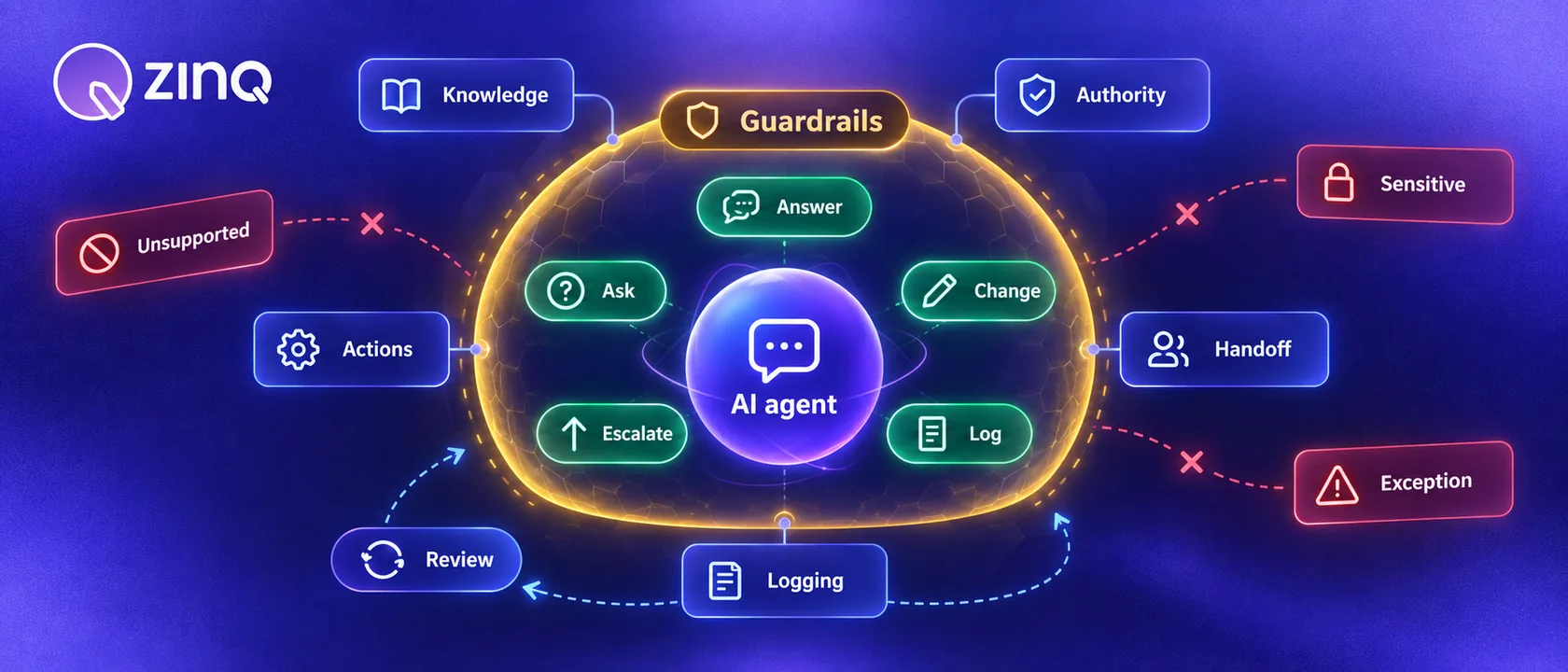
AI agent guardrails define what an agent may answer, ask, change, promise, escalate and log so customer conversations stay useful without letting automation exceed its authority.
Key takeaways
- Guardrails should cover knowledge, authority, permissions, handoff and review.
- The agent should stop when it cannot verify an answer or the customer needs a person.
- Action permissions matter as much as answer quality.
- Logs should help teams improve sources, workflows and handoff rules.
Why guardrails matter
Customer-facing AI agents need more than good prompts. They need operating rules. A customer may ask about pricing, availability, refunds, delivery, appointment changes, complaints or sensitive details. Some of those questions are safe to answer. Some need a person. Some need the agent to collect context but not decide.
Guardrails define those boundaries. They tell the agent what it may answer, what it may ask, what it may change and when it must hand off.
This matters even more when people search for AI chatbot or automated chatbot and expect fast replies. Speed is useful only if the answer stays inside the business’s rules.
The five guardrail areas
A practical customer conversation guardrail system covers five areas.
| Guardrail area | What it controls |
|---|---|
| Knowledge | Which sources the agent may use |
| Authority | Which questions it may answer or decline |
| Actions | What it may book, update, route or trigger |
| Handoff | When a human must review or take over |
| Logging | What gets recorded for review and improvement |
If one of these is missing, the agent can sound useful while still creating operational risk.
Knowledge guardrails
Knowledge guardrails define what the agent can rely on. For customer operations, that should mean approved business information, not general guesses.
Examples include:
- product or service pages
- policy documents
- booking rules
- pricing pages that are approved for public use
- support macros
- location-specific details
- integration data the agent has permission to read
The agent should avoid answering from stale, conflicting or private information. If the source is missing, the better behavior is to ask for clarification or hand off.
ZINQ’s knowledge features are meant for this exact reason: the agent should use what the business has approved.
Authority guardrails
Authority guardrails decide what the agent is allowed to say.
For example, the agent may answer:
- business hours
- service availability from approved pages
- appointment preparation steps
- order status when connected to the right system
- public policy information
The agent should not decide:
- custom discounts
- refund exceptions
- clinical, financial or legal advice
- disputed customer cases
- sensitive complaints
- promises about outcomes the business has not approved
The wording matters. “I can collect the details and send this to our team” is safer than inventing an answer to look helpful.
Action guardrails
Action guardrails control what the agent can do, not only what it can say.
An agent may be allowed to suggest a booking slot but not confirm it. Or it may confirm only when the calendar integration returns an available slot. It may create a task but not close a complaint. It may update a lead stage but not change a price.
Write action permissions as specific rules:
- Can the agent create, update or only suggest?
- Does the customer need to confirm first?
- Which system is the source of truth?
- What happens if the integration fails?
- Who receives the exception?
This is where workflow automation needs safe defaults. An agent that can act should also know when not to act.
Handoff guardrails
Handoff guardrails define when a person takes over.
Common triggers include:
- the customer asks for a human
- the agent cannot verify the answer
- the customer is angry or distressed
- the request involves a sensitive topic
- the value is high
- the policy has an exception
- the integration fails
- the customer repeats the same question
The handoff should include context. A human should receive the customer’s goal, collected details, source used, reason for escalation and next requested action. Otherwise the customer pays the price by repeating everything.
Use human handoff as part of the designed flow, not as a panic button.
Data and privacy guardrails
Customer-facing agents should collect only what the workflow needs. If a lead qualification workflow needs location, service interest and timing, do not ask for unnecessary personal data. If a support flow needs an order number, do not ask for unrelated details.
For industries such as healthcare, banking, insurance and travel, the boundary is even more important. The agent may collect administrative information and route it. It should not make professional judgments unless the product behavior and review process support that use case.
When in doubt, collect less and hand off sooner.
Review guardrails
Review should improve the system, not slow every conversation forever.
Review these cases first:
- unanswered questions
- handoffs with missing context
- customer complaints
- corrected answers
- failed integrations
- conversations where the customer repeated themselves
- high-value sales conversations
Use the findings to update knowledge, change routing rules or adjust the agent’s authority. Do not only rewrite prompts. Many failures come from missing source content or unclear workflow ownership.
A launch checklist
Before launching a customer-facing agent, answer these questions:
- Which sources may the agent use?
- Which topics are out of scope?
- What actions may it take?
- Which actions need customer confirmation?
- Which cases require human handoff?
- What should the handoff include?
- What data should the agent avoid collecting?
- Who reviews wrong or uncertain answers?
- Which metrics show whether the guardrails work?
If the team cannot answer these questions, the agent is not ready for more volume.
Conclusion
AI agent guardrails are not paperwork. They are the operating boundary that makes automation safe enough to use with real customers. Define sources, authority, actions, handoff and review before the first live workflow. Then improve those rules from real conversations.
Frequently asked questions
What are AI agent guardrails?
They are rules and controls that define what an AI agent can use, say, ask, do and escalate during a customer conversation.
Are guardrails only about preventing bad answers?
No. They also control actions, permissions, data collection, handoff, follow-up, review and escalation.
What is the most important guardrail?
The agent must know when to stop. If it cannot verify an answer, lacks permission or detects a sensitive request, it should ask, route or hand off.
How often should guardrails be reviewed?
Review them whenever knowledge changes, a new workflow launches, a risky failure appears or the business gives the agent a new action.
Conclusion
Guardrails make customer-facing AI agents easier to trust. Start with source limits, action permissions and handoff triggers, then improve them from real conversation review.
READY TO SEE ZINQ IN ACTION?
From first enquiry to conversion, follow-up and support, ZINQ helps automate the next step while keeping your team in control.
Book a DemoRelated articles
-
How to set up human handover in an AI support workflow
A human handover is complete when the right person or queue receives the unresolved request with usable context. Define triggers, ownership, customer expectations and control of further automated replies before rollout.
Pavan · June 17, 2026 · Customer Support & CX -
How to evaluate an AI customer service agent
Evaluate an AI customer service agent with a repeatable set of realistic customer requests, expected outcomes and pass-or-fail checks. Include routine questions, missing information, unsupported requests, tool failures and human handoffs, then verify the final customer or business record instead of grading the agent's wording alone.
The ZINQ team · September 21, 2026 · AI Agents & Conversational AI -
Customer service automation examples with exception handling
Useful customer service automation examples include the exception path, not only the successful reply. For every automated answer or action, define what happens when information is missing, identity fails, a system is unavailable, policy requires judgment or the customer asks for a person.
The ZINQ team · September 21, 2026 · Workflows & Automation