AI booking agent: automate appointment requests without losing control
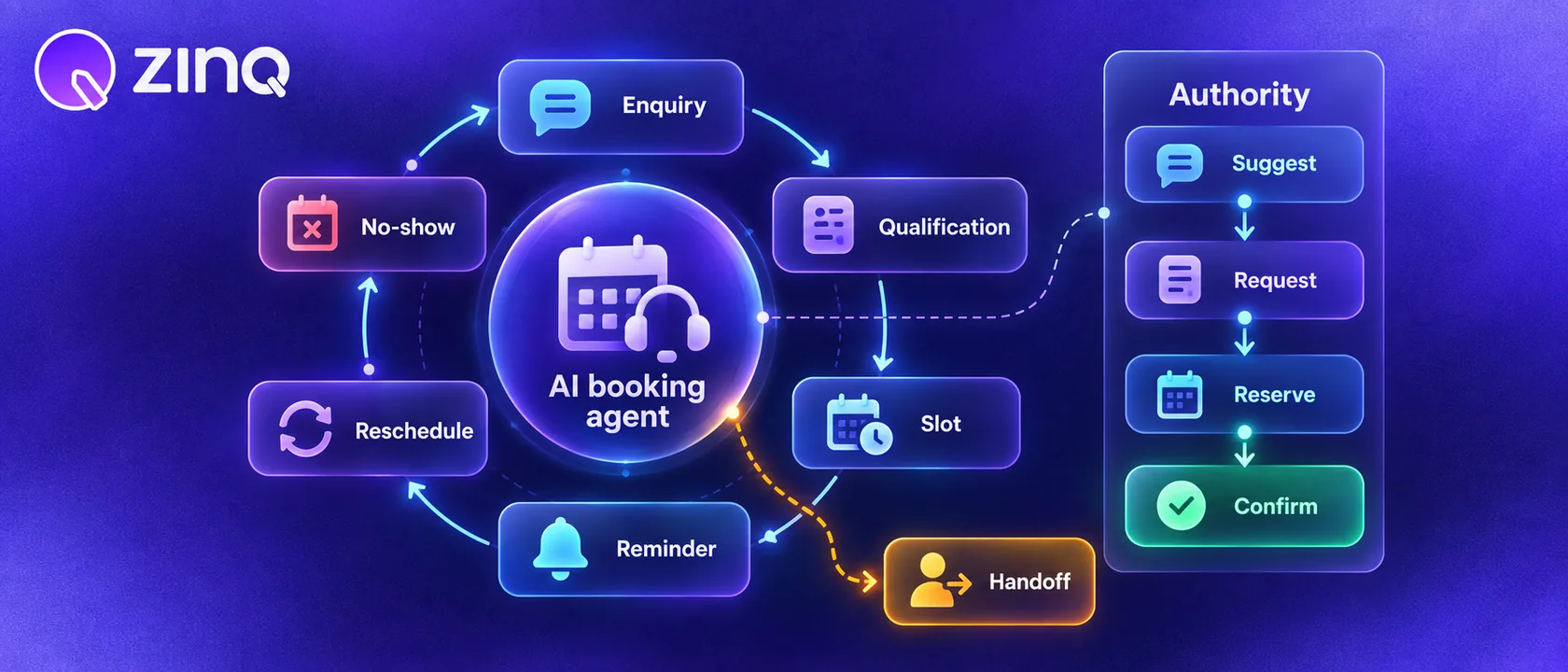
An AI booking agent handles appointment or reservation requests by collecting the right details, checking approved booking rules, confirming the next step, sending reminders and handing complex cases to a person.
Key takeaways
- An AI booking agent should collect the details needed for a valid booking before it promises a slot.
- Booking authority must be clear: suggest, request, reserve or confirm, depending on the business rules.
- Reminders, rescheduling and no-show recovery are part of the booking workflow, not separate afterthoughts.
- Complex, sensitive or high-value booking cases should hand off with the customer's context.
What an AI booking agent does
An AI booking agent helps customers move from “I want an appointment” to a confirmed or staff-reviewed next step. It can collect service type, location, preferred time, contact details and other booking information in the customer’s channel.
The agent may confirm a slot only when it has the authority and connected availability to do so. In many businesses, the better first workflow is request collection and staff confirmation. That is still useful because the team receives the details in a structured way instead of chasing the customer later.
People may search for a booking chatbot or chatbot for appointment booking. The stronger buying question is whether the workflow can handle the full booking path, including reminders, rescheduling and exceptions.
The booking workflow has more than one step
Booking starts before the calendar entry and continues after it.
| Stage | Customer need | Agent role |
|---|---|---|
| Enquiry | ”Can I book?” | Understand service, location and timing |
| Qualification | ”Is this the right appointment?” | Ask required questions before booking |
| Slot handling | ”What time works?” | Suggest, request or confirm based on authority |
| Reminder | ”Will I remember?” | Send approved reminders |
| Change | ”Can I reschedule?” | Collect request or change if permitted |
| No-show recovery | ”Can I still come?” | Route to the right next step |
This is why appointment booking should connect to follow-up aftercare and no-show recovery when the business depends on attendance.
Define booking authority
The biggest mistake is letting the agent sound more certain than the business process allows. Define authority before launch.
There are four common levels:
- Suggest. The agent shares available booking windows or the usual process.
- Request. The agent collects details and sends the request to staff.
- Reserve. The agent temporarily holds a slot until staff or the customer confirms.
- Confirm. The agent books the appointment directly because availability and rules are connected.
Each level can be valid. A small clinic may start with request collection. A service team with a connected calendar may allow direct confirmation. A high-value consultation may always require review.
What details should the agent collect?
The required details depend on the business, but most booking workflows need:
- customer name and contact channel;
- service or appointment type;
- preferred date or time range;
- location or branch;
- new or returning customer status;
- any preparation or eligibility details;
- consent for reminders if required by the channel and region.
For clinical and healthcare workflows, keep the agent in administrative work. It can collect booking information and route questions, but it should not diagnose, recommend treatment or make clinical decisions.
A practical appointment example
A customer sends an Instagram DM: “Do you have a consultation slot tomorrow?”
The AI booking agent asks which service they need, checks whether tomorrow slots can be requested or confirmed, collects the customer’s name and phone number, and gives the next step. If the rules allow confirmation, it confirms. If not, it sends a staff task with the customer’s preferred time and service.
If the customer asks a sensitive or unusual question, the agent hands off. The staff member sees the conversation, the requested service and the missing decision.
This workflow is not flashy. It is valuable because it stops good enquiries from sitting unanswered overnight.
Connect booking to the systems that matter
Booking agents become more useful when they connect to the systems the team already uses. That may include a calendar, CRM, inbox, task list or notification workflow.
ZINQ’s connectors and workflows are relevant here because booking is rarely only a chat. A booking request may need to create a contact, update a pipeline, notify staff and send reminders.
If the business is not ready for direct calendar access, start with structured booking requests. That still improves speed and reduces incomplete enquiries.
How to measure an AI booking agent
Measure the booking result, not only reply speed.
Useful measures include:
- completed booking requests;
- requests missing required details;
- time to staff confirmation;
- reschedule completion;
- no-show rate by workflow;
- reminder delivery;
- handoff reasons;
- customer drop-off after the first message.
The review should ask one hard question: did the agent make it easier for the customer to reach a booked next step?
Where ZINQ fits
ZINQ helps businesses handle booking conversations across channels such as WhatsApp, Instagram, web chat, Telegram, email and voice. The agent can collect details, use approved knowledge, follow workflow rules and hand over cases that need staff.
For appointment-led teams, start with one booking journey. Map the enquiry, required details, authority level, reminder rule and handoff path. Once that works, add rescheduling, no-show recovery or follow-up.
Frequently asked questions
What is an AI booking agent?
It is an AI agent that helps handle appointment, reservation or consultation requests by collecting details, applying booking rules, confirming the next step and escalating cases that need staff.
Is an AI booking agent the same as a booking chatbot?
A booking chatbot may answer scheduling questions or collect a form. An AI booking agent should manage more of the booking workflow, including qualification, reminders, rescheduling and handoff.
Can it confirm appointments automatically?
Only if the business has connected availability, clear booking rules and permission for the agent to confirm. Otherwise it should collect the request and route it for staff confirmation.
Which businesses can use an AI booking agent?
Clinics, salons, real estate teams, travel teams, automotive service departments, consultants and other appointment-led businesses can use it when the booking rules and handoff path are clear.
Conclusion
An AI booking agent works best when the business treats booking as a workflow: collect the right details, apply rules, confirm only when permitted, send reminders and hand off exceptions with context.
READY TO SEE ZINQ IN ACTION?
From first enquiry to conversion, follow-up and support, ZINQ helps automate the next step while keeping your team in control.
Book a DemoRelated articles
-
How to write useful AI-assisted follow-up messages
AI can draft a follow-up message from a verified conversation, but the message still needs a clear reason, an accurate next step and permission to use the chosen channel. Avoid invented urgency, discounts or claims about what the customer wants.
Pavan · July 29, 2026 · Sales & Conversion -
Connecting an AI agent to your CRM and calendar
An AI-to-CRM or calendar integration needs supported operations, limited permissions, clear field mapping and a way to verify writes. Test duplicate requests and partial failures before letting a conversation change live records.
Pavan · June 30, 2026 · Integrations -
Does your service business need an AI agent?
A service business may benefit from an AI agent when recurring enquiries have reliable answers or supported next steps. Low enquiry volume, highly bespoke work or unclear processes may make a simpler form or a person-led response more appropriate.
Pavan · July 13, 2026 · AI Agents & Conversational AI