Website Chatbot for Lead Capture and Customer Support
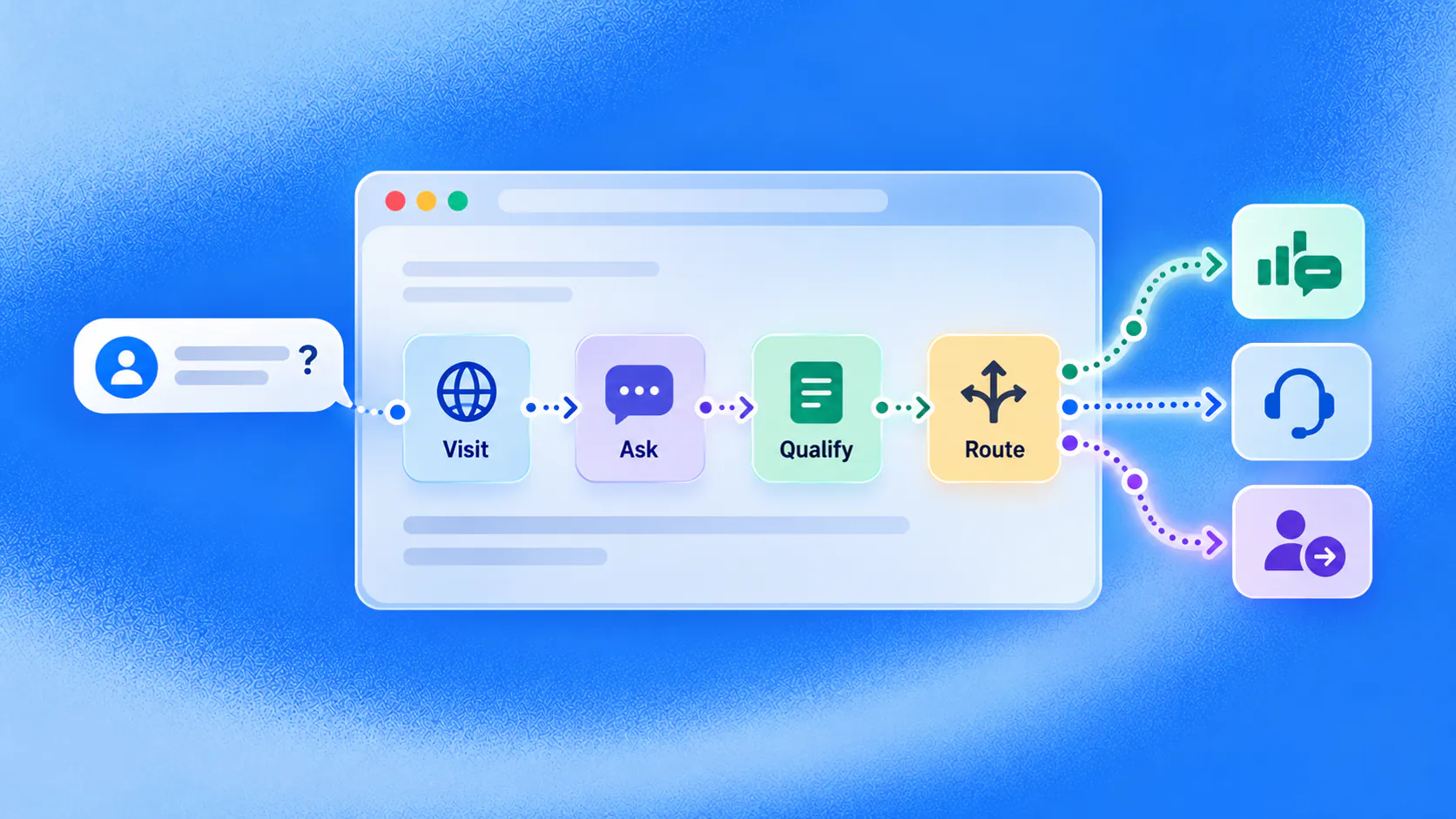
A website chatbot can respond while a visitor is evaluating a page, answer approved questions, use page context to understand likely intent, collect details that affect the next step and move the conversation towards booking, checkout, support or a person.
Key takeaways
- Match the conversation to the visitor's page and question instead of opening with a generic menu.
- Answer the immediate question before asking for contact or qualification details.
- Use verified connected information for availability, price, orders and completed actions.
- Measure the next customer step, abandonment and handoff quality rather than chat volume alone.
What should a website chatbot do for a visitor?
A website chatbot should help a visitor answer the question that is blocking a useful next step. On a service page, that may be whether the service fits the stated requirement. On a product page, it may be compatibility or delivery. On a pricing page, it may be which plan suits a particular use.
The chatbot should use the page as context, not as proof of intent. Someone reading pricing may still need support. A returning visitor may be researching for the first time. Let the person explain the goal and make it easy to correct assumptions.
Imagine an illustrative visitor on a consultation page after staffed hours. They ask whether the service is available in their location. The conversation answers from approved information, asks which location they prefer and offers an eligible booking path. A generic “leave your email and we will reply” form would postpone the question that brought them there.
Related must-read articles
- What is a chatbot?
- Chatbot examples for sales and service
- Lead generation chatbot guide
- Appointment booking chatbot guide
- How to create a chatbot
Where do website visitors lose momentum?
Visitors leave when they cannot find a specific answer, do not know which option fits or cannot see what happens after submitting a form. A website chatbot can reduce that friction when it works around the visitor’s task rather than the business’s navigation structure.
Common gaps include:
- A product page that cannot answer fit or compatibility questions
- A service page with no clear consultation route
- A pricing page that explains packages but not selection
- A booking page with unavailable or confusing options
- A checkout page where delivery or return uncertainty remains
- A support page that sends every problem to the same form
The goal is not to keep someone chatting. It is to help the person make progress.
How should page context change the conversation?
The same opening on every page wastes information the visitor has already provided through navigation. A website chatbot can use the current page and permitted session context to offer a relevant starting point.
| Page | Useful opening task | Avoid |
|---|---|---|
| Product | Answer fit, feature or delivery questions | Generic newsletter capture |
| Service | Clarify need and offer the right next step | Asking for every contact detail first |
| Pricing | Explain plan differences and route complex cases | Claiming a plan is suitable without context |
| Booking | Find an eligible service, location and time | Treating a request as confirmed without calendar evidence |
| Support | Identify the issue and retrieve approved guidance | Hiding the route to a person |
Context should shorten the path, not narrow it incorrectly. Always let the visitor ask another question.
How can a website chatbot qualify an enquiry?
Qualification begins after the visitor receives value. Answer the first useful question, then ask only for details that affect fit, route or action.
A practical sequence is:
- Understand the immediate goal. Let the visitor describe the need naturally.
- Answer from approved information. Resolve the first uncertainty where possible.
- Collect decisive details. Ask about timing, location, intended use or another relevant factor.
- Offer a suitable next step. Booking, demo, checkout, resource or staff conversation may fit.
- Record the state. Make clear whether the action is complete, pending or transferred.
The lead qualification use case provides the operating context for routing enquiries without turning the chat into a long form.
Can the chatbot support product and service discovery?
A website chatbot can ask about declared requirements and narrow suitable options using maintained attributes. It should explain why an option appears and give the visitor a way to change the criteria.
For ecommerce, use current catalogue, stock, price and delivery information from responsible systems. For services, distinguish public administrative information from professional advice. In regulated settings, diagnosis, suitability decisions and consequential recommendations remain with qualified people.
Discovery should make choice easier. It should not pretend that every visitor needs the product the business most wants to sell.
How should booking or checkout work?
A conversational next step needs a verified completion state. If the website chatbot offers an appointment, the connected calendar should confirm it. If the conversation restores a cart, the commerce system should provide the current items and status.
Tell the visitor whether the request is:
- Confirmed
- Awaiting staff review
- Missing required information
- Unavailable with an alternative offered
- Failed and assigned for recovery
Use the appointment booking use case and workflow layer to define what the business owns after the message.
When should the conversation ask for contact details?
Ask when contact information is needed to deliver the requested next step, not as the price of receiving basic public information. Explain why the detail is needed and how the team will use it.
An anonymous visitor may be able to compare options or read an answer without identification. A booking, saved enquiry or staff callback may require contact details. Sensitive data needs stronger controls, and optional information should remain optional.
A website chatbot should not claim to know a person from hidden tracking or use undisclosed information to pressure the conversation.
How should human handoff work on a website?
Transfer when the visitor asks, the question exceeds approved knowledge, negotiation or judgment is required, identity cannot be established or a connected action fails.
The employee should receive:
- The page and entry context
- The visitor’s stated goal
- Answers and preferences already collected
- Actions already attempted
- The current completion or failure state
- The reason for transfer
The human handoff capability should help the visitor continue rather than restart. Outside staffed hours, create an owned follow-up and set an honest expectation.
What accessibility and privacy checks matter?
The website chatbot must not block navigation or become the only way to reach important information. Test keyboard access, focus order, readable contrast, zoom, screen-reader labels, error messages and the ability to close or bypass the widget.
Explain relevant data collection, respect consent choices and limit retention to the business purpose. Do not make the conversation appear mandatory when another route is available. Accessibility and privacy reviews should use the current legal and technical requirements for the target market.
How do you measure website chatbot performance?
Measure whether the visitor reached a useful next step:
- Relevant questions answered
- Enquiries that completed useful qualification
- Booking, checkout or demo steps completed
- Visitors who abandoned during questioning
- Unsupported questions identified for review
- Transfers received with usable context
- Failed actions and time to recovery
- Repeat contact about the same unresolved issue
The analytics layer should connect conversations to observable workflow states. Do not call a chat successful simply because the visitor sent several messages.
What should you test before launch?
Test the website chatbot on mobile and desktop across the pages where it appears. Use short, vague, misspelled and multi-part questions. Include a visitor who refuses contact details, an unavailable action, outdated information, a direct request for a person and a return after the session pauses.
Review the employee experience in the omnichannel inbox. If the team cannot see the page context or previous answers, the handoff is incomplete.
What is a sensible first website use case?
Choose a page where visitors show clear intent and repeatedly encounter the same barrier. A high-traffic product page may need discovery support. A service page may need enquiry qualification. A booking page may need appointment guidance.
The best first website chatbot journey has current information, an observable outcome and a responsible owner. Launch narrowly, review real conversations and expand only after the successful and failed paths are reliable.
Who should own the website conversation after launch?
A website chatbot crosses marketing, sales, service and operations. Marketing may own the page and entry context, while another team owns the booking, order or support result. Name one operating owner for the complete journey so gaps are not passed between departments.
The owner should review unanswered questions, abandoned steps, failed actions and delayed handoffs. Page owners should receive recurring questions that indicate missing website content. Sales and service leaders should confirm that collected information is useful rather than excessive.
When a page, price, policy or workflow changes, update the website chatbot at the same time. Retest the affected successful and exception paths before release. A stale answer on a high-intent page can create more friction than no widget at all.
Set a regular review cadence and a route for employees to flag poor conversations. The website chatbot improves when the people receiving its work can explain what helped, what was missing and what should have gone directly to a person.
Additional resources
- Web chat channel
- Knowledge management
- Website workflows
- Lead qualification
- Customer service
- Book a ZINQ demo
Frequently asked questions
What does a website chatbot do?
It engages website visitors in a conversation, answers approved questions, collects relevant enquiry details and guides people towards an appropriate next step or staff member.
Where should a chatbot appear on a website?
Place it where customers have a clear question or task, such as product, service, pricing, booking, checkout and support pages. The opening should reflect the page rather than interrupt every visitor identically.
Can a website chatbot identify every visitor?
No. Many visitors are anonymous. Identification, tracking and personalization should use only appropriate, disclosed and permitted information.
Conclusion
A website chatbot creates value when it helps a visitor resolve the question blocking the next step. Page relevance, concise qualification, verified actions and accountable human ownership matter more than making the widget appear everywhere.
READY TO SEE ZINQ IN ACTION?
From first enquiry to conversion, follow-up and support, ZINQ helps automate the next step while keeping your team in control.
Book a DemoAdditional resources
-
What Is a Chatbot? Business Uses and Examples
A chatbot is software that holds a text or voice conversation with a person. Businesses use one to answer common questions, collect information, guide a customer through a defined task and bring in a person when the request needs judgment.
The ZINQ team · October 30, 2026 · Comparisons & Guides -
Lead Generation Chatbot: Qualification and Follow-Up
A lead generation chatbot engages an inbound enquiry, answers the prospect's first question, collects the details that affect fit or routing and gives the conversation a clear next step. It should qualify declared intent without making hidden assumptions or forcing every prospect through a long form.
The ZINQ team · October 30, 2026 · Sales & Conversion -
How to Create a Chatbot for Your Business
To create a chatbot for a business, choose one customer task, define the information and actions it needs, write the successful and exception paths, connect only the required systems, provide human ownership and test real conversations before launch.
The ZINQ team · October 30, 2026 · AI Chatbots