Appointment Booking Chatbot: Scheduling and Confirmation
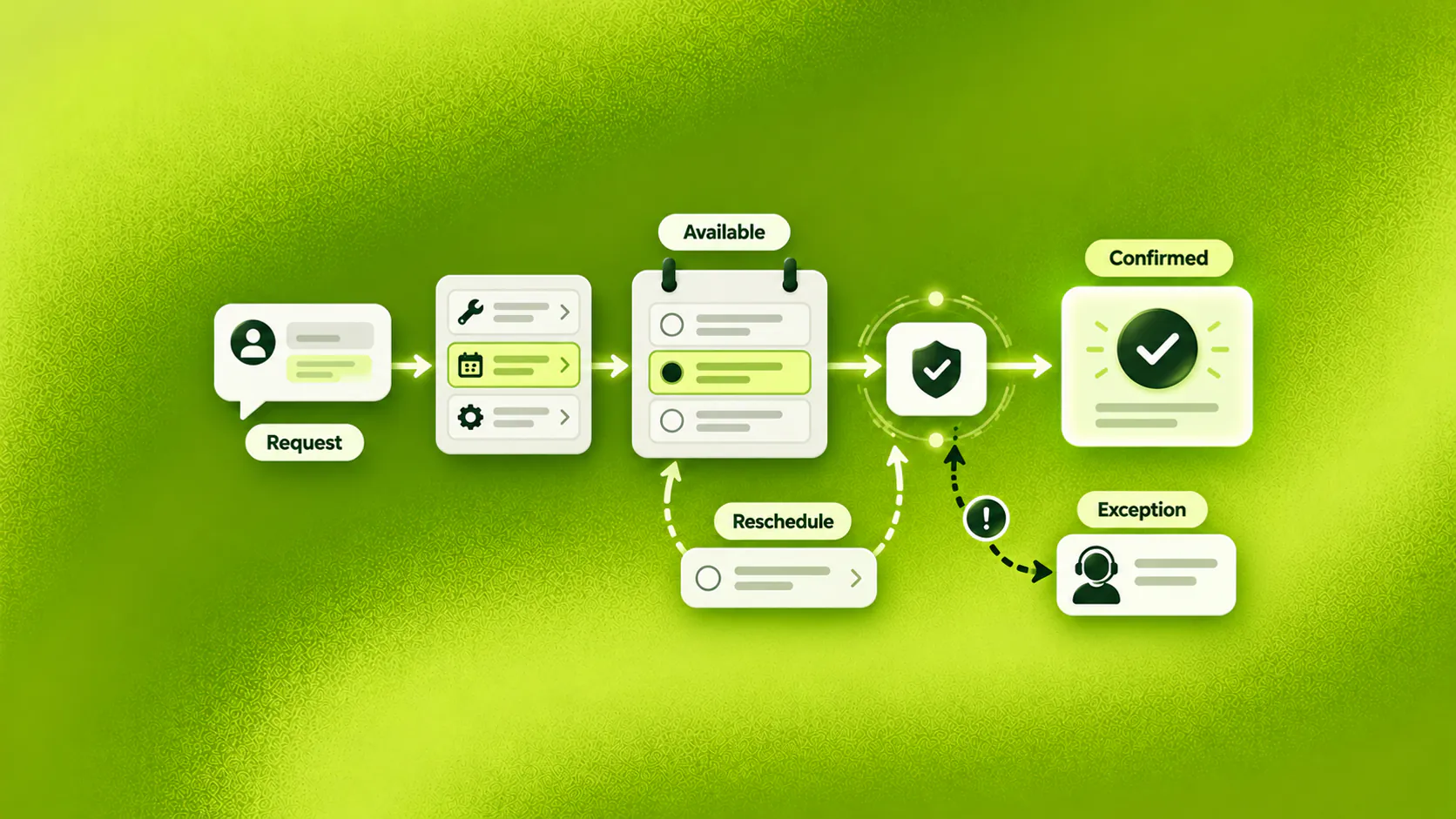
An appointment booking chatbot turns an enquiry into a confirmed slot by identifying the requested service, collecting the minimum required details, checking authorised availability and recording the booking in the connected system. If confirmation is unavailable, it should create a pending request and set an honest expectation.
Key takeaways
- An appointment booking chatbot should distinguish a confirmed booking from a request awaiting staff action.
- Collect only the information needed to find the right service, slot or owner.
- Rescheduling, cancellations, unavailable calendars and special requirements need explicit recovery paths.
- Measure confirmed appointments, incomplete requests, changes, failed confirmations and staff follow-up time.
What does an appointment booking chatbot do?
An appointment booking chatbot helps a customer move from “Do you have time next week?” to a confirmed slot or an honestly described pending request. It identifies the service, gathers the details that affect scheduling, checks authorised availability and records the outcome.
The word “confirmed” matters. If the calendar connection is unavailable or staff approval is required, the appointment booking chatbot should not promise a slot. It should capture the preference, assign the request and explain what happens next.
Consider an illustrative enquiry for a service business. A prospective customer messages after hours and asks for a Tuesday appointment. The conversation checks which service they need, offers valid Tuesday times and records the selected slot. If the request includes a special condition, it moves to staff with the details attached rather than forcing an unsuitable booking.
Related must-read articles
- What is a chatbot?
- Chatbot examples across sales and service
- Lead generation chatbot guide
- AI appointment setting chatbot guide
- Conversational AI for appointment booking
Why do appointment enquiries become manual work?
The customer sees a simple question. The team sees several decisions: which service, which location, how long the slot should be, who can provide it and whether preparation or approval is required.
Availability lives somewhere else
A messaging conversation may collect a preferred time, but the actual calendar sits in another system. Staff copy details between the two, check conflicts and return later with options. An appointment booking chatbot can reduce that back-and-forth only when it reads the appropriate availability or creates a clearly owned request.
The business collects the wrong details
Some forms ask for everything before showing a slot. Others collect too little, leaving staff to restart the conversation. The booking flow should ask only what determines service, duration, location, eligibility or routing.
Changes arrive in different channels
A customer books on the website, requests a change through WhatsApp and follows up by email. Supported-channel conversations can appear in a shared inbox, but the business still needs reliable booking identifiers and identity rules. It should not assume that every channel identity automatically belongs to one person.
Nobody owns failed bookings
A full calendar, broken connection or unusual request can leave the conversation suspended. The booking experience needs a recovery path with an accountable queue or person. Otherwise, automation hides the request rather than handling it.
How should the booking conversation work?
The simplest useful flow has six stages.
1. Identify the appointment goal
Ask what the customer wants to arrange. Use their language, then map it to the correct service or booking type. If the request needs professional judgment, do not use the conversation to decide suitability.
2. Collect the details that affect scheduling
The conversation may need a preferred day, location, service type and contact method. A longer appointment may require one more question than a standard visit. Avoid collecting sensitive or unrelated information simply because the form allows it.
3. Offer authorised availability
Show only slots that the relevant source reports as available. Consider duration, staff, location, buffer time and any configured rule that the scheduling system enforces. The appointment booking use case provides the wider workflow context.
4. Confirm the selected slot
Write the booking to the connected system, then return the confirmed date, time, location and relevant preparation information. The appointment booking chatbot should not treat a button click as confirmation before the system accepts it.
5. Send permitted reminders
Reminders may help customers remember the appointment and provide a route to change it. They need the right consent, timing, channel rules and opt-out handling. For scheduled services, the follow-up journey can define ownership after booking.
6. Move exceptions to staff
Special requirements, unavailable services, unclear identity, complaints and requests outside policy need a person. The transfer should include what the customer requested, which slots were considered and why the automated path stopped.
What should happen when a customer reschedules or cancels?
Changes deserve their own design. They are not a reversed booking flow.
Before changing an appointment, the system may need to verify the record and apply the business’s cancellation or notice policy. It should show the current appointment, confirm the requested change and wait for connected-system confirmation.
If a fee, refund, exception or professional decision is involved, staff should take responsibility. The conversation can collect the request and explain the next step, but it should not interpret policy beyond the approved rule or approve an exception.
After a successful change, reminders tied to the old appointment must stop. A duplicate reminder can undo the confidence created by an otherwise smooth conversation.
Where can appointment booking work?
The right channel depends on where enquiries already arrive.
- Website chat can help a visitor ask a question before choosing a slot.
- WhatsApp can support asynchronous enquiries, confirmations and permitted reminders.
- Instagram can respond to supported DMs and move an interested person towards an appropriate booking path.
- Email can carry longer requests or formal confirmation where the implementation supports it.
An appointment booking chatbot should adapt to channel behaviour without creating separate truths. Availability and booking status must still come from the authoritative source.
Which industries need different booking rules?
The conversation changes with the service.
Clinics and healthcare
Keep the journey administrative. An appointment booking chatbot may help with service information, location, availability, consented reminders and preparation approved by the clinic. Diagnosis, urgency assessment, treatment suitability and medical advice remain with qualified people. Clinical messaging also needs jurisdiction-specific privacy, professional-conduct and advertising review.
Real estate
A property enquiry may lead to a viewing request. The conversation can collect property interest, broad timing and contact details. Availability, access and agent confirmation still determine whether the viewing is booked. See the real estate industry journey.
Automotive
Vehicle sales may involve test drives, while after-sales teams manage service appointments. The booking conversation should distinguish the two, collect the relevant vehicle or model information and route exceptions to the correct team. The automotive industry page shows the wider customer journey.
SaaS and professional services
A demo or consultation request may need basic qualification before scheduling. The conversation can collect intended use, team context and preferred time, then send a suitable request to sales. It should not force an early-stage researcher into a meeting. Review the SaaS industry journey.
How should you measure an appointment booking chatbot?
Measure the booking result, not only reply speed.
Useful measures include:
- Enquiries that reached valid availability
- Confirmed appointments
- Requests left pending for staff
- Customers who abandoned before selecting a slot
- Reschedules and cancellations completed correctly
- Duplicate or conflicting bookings
- Failed calendar or workflow actions
- Time for staff to own an exception
- Reminder delivery and customer responses where supported
An appointment booking chatbot can look successful while creating manual cleanup. Review the booking system, conversation record and staff queue together. The analytics platform is useful only when those states are captured accurately.
What should you test before launch?
Test a normal booking, a fully booked day, a request outside working hours, an invalid identifier, a duplicate request, a calendar outage, a cancellation inside a restricted period and a direct request for a person.
Also check the exact language shown at each state. “Booked,” “requested” and “awaiting confirmation” are not interchangeable. The appointment booking chatbot should leave the customer knowing which state applies and who owns the next step.
Start with one appointment type and one location. Expand after staff trust the availability, confirmation and exception handling. A narrow booking path that records the truth is better than a broad one that creates attractive messages and unreliable calendars.
How should reminders and missed appointments work?
A confirmed slot is not the end of the booking journey. Customers may need preparation information, a reminder and a simple way to change plans. The conversation can support those administrative steps when consent, channel rules and the scheduling source allow them.
Send only information that applies to the booked service. A generic reminder that omits the location or uses the old time after a reschedule creates more work for staff. The reminder should draw from the current appointment record and stop when the booking is cancelled.
Offer a clear change path. If the customer replies that they cannot attend, the conversation can show permitted alternatives or collect a rescheduling request. The appointment booking chatbot should apply notice rules consistently and involve staff when a fee, refund, exception or sensitive circumstance needs judgment.
After a missed appointment, the next action depends on the industry and the customer’s permission. A service business may offer a rebooking path. A clinic must keep communication administrative, respect privacy and follow the professional and messaging rules for its jurisdiction. No automated message should diagnose urgency or pressure someone into care.
Measure whether reminders lead to confirmations, changes, opt-outs or unanswered messages. Do not treat delivery alone as success. The operational goal is a current schedule and a clear next step for the customer and team.
Reminder and recovery logic should be tested with reschedules, cancellations and duplicate records. Otherwise, the appointment booking chatbot may continue a sequence that no longer matches the booking state.
Additional resources
- Explore appointment booking
- Plan lead qualification
- Review workflow controls
- Design human handoff
- Book a ZINQ demonstration
Frequently asked questions
What is an appointment booking chatbot?
An appointment booking chatbot is a conversational interface that collects booking requirements, offers suitable availability when connected to an authorised schedule and confirms or routes the request.
Can an appointment booking chatbot reschedule appointments?
It can support rescheduling when identity, policy, availability and connected-system permissions allow it. Otherwise, it should collect the request and assign it to staff without claiming the change is complete.
What information should an appointment booking chatbot collect?
Collect only what affects the appointment, such as service type, preferred timing, location, contact details and any permitted preparation requirement. Sensitive or professional questions should go to qualified staff.
Conclusion
An appointment booking chatbot is useful when it shortens the path from interest to a verified next step. Reliable availability, honest confirmation and clear exception ownership matter more than making the conversation look effortless.
READY TO SEE ZINQ IN ACTION?
From first enquiry to conversion, follow-up and support, ZINQ helps automate the next step while keeping your team in control.
Book a DemoAdditional resources
-
What Is a Chatbot? Business Uses and Examples
A chatbot is software that holds a text or voice conversation with a person. Businesses use one to answer common questions, collect information, guide a customer through a defined task and bring in a person when the request needs judgment.
The ZINQ team · October 30, 2026 · Comparisons & Guides -
Chatbot Examples for Sales and Customer Service
Useful chatbot examples solve a defined customer task, such as qualifying an enquiry, finding a suitable product, requesting an appointment, checking an order or preparing a support handoff. The strongest examples end with a visible outcome rather than an automated reply alone.
The ZINQ team · October 30, 2026 · Comparisons & Guides -
Lead Generation Chatbot: Qualification and Follow-Up
A lead generation chatbot engages an inbound enquiry, answers the prospect's first question, collects the details that affect fit or routing and gives the conversation a clear next step. It should qualify declared intent without making hidden assumptions or forcing every prospect through a long form.
The ZINQ team · October 30, 2026 · Sales & Conversion