How to Create a Chatbot for Your Business
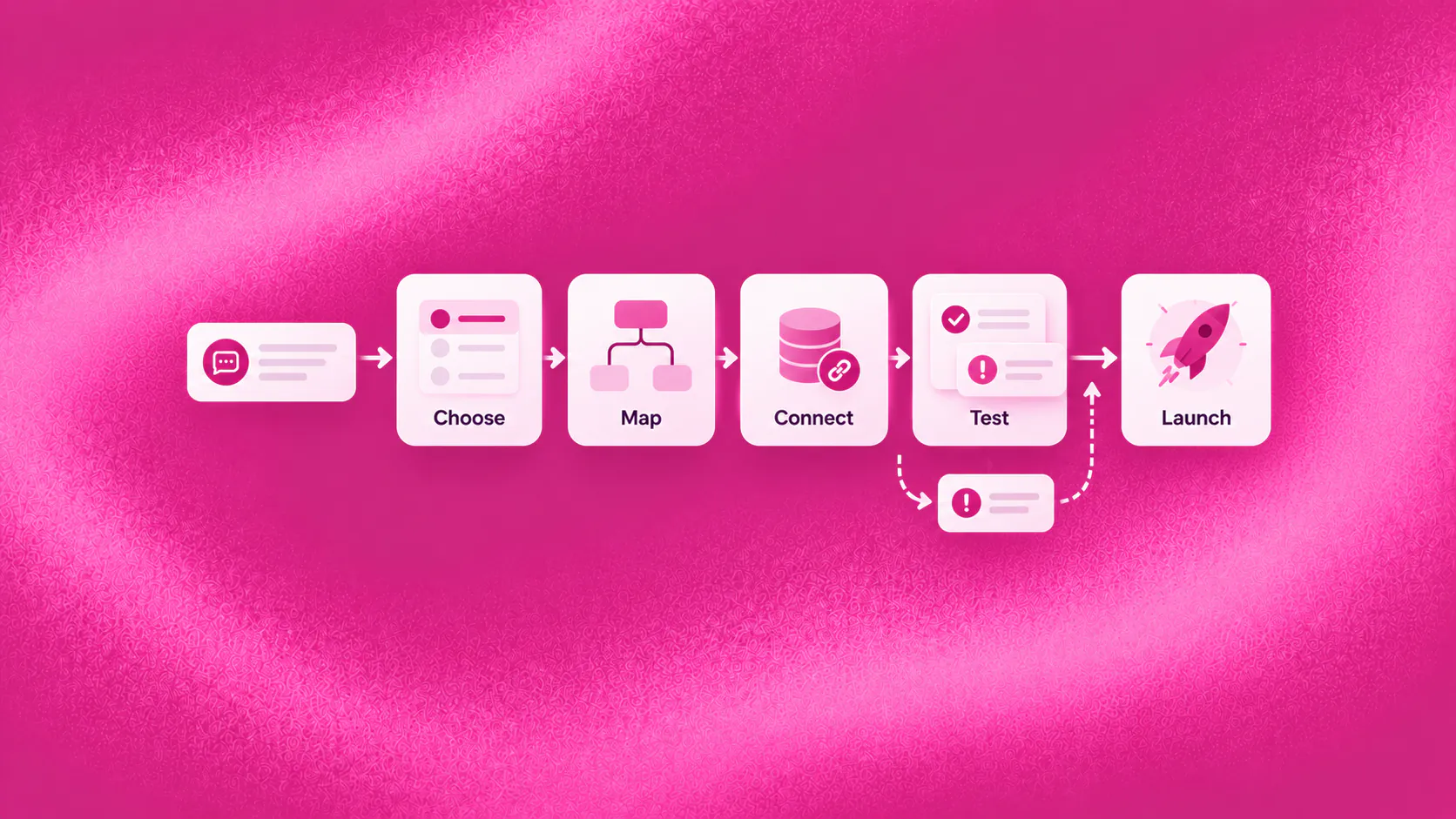
To create a chatbot for a business, choose one customer task, define the information and actions it needs, write the successful and exception paths, connect only the required systems, provide human ownership and test real conversations before launch.
Key takeaways
- Begin with one customer task that has a clear outcome, reliable information and a responsible business owner.
- Design the successful path and the exceptions before choosing features or writing every possible response.
- Connect only the systems required to complete the first task, and never claim that an action succeeded without confirmation.
- Test real wording, missing information, system failures and requests for a person before launch.
How do you create a chatbot that customers will use?
To understand how to create a chatbot, begin with the work a customer is already trying to complete. Do not begin with a list of features. A useful first brief sounds like “help an interested visitor choose the right consultation and request a time,” not “automate customer engagement.”
Consider an illustrative service enquiry arriving after staffed hours. The visitor wants to know whether a service fits a particular requirement. A useful conversation answers from approved information, asks only what affects the next step and records a booking request or routes the enquiry. A poor one presents five menu buttons, collects contact details and leaves the customer waiting without explaining what happens next.
The difference is not conversational polish. It is whether the customer reaches a visible outcome and whether the team knows what it owns.
Related must-read articles
- What is a chatbot?
- Chatbot examples for sales and service
- Customer service chatbot guide
- Lead generation chatbot guide
- Appointment booking chatbot guide
Which chatbot use case should you choose first?
The first use case should be frequent enough to matter but bounded enough to operate safely. Look at actual enquiries, missed messages, support records and staff interviews. Find the moment where customers repeatedly wait, abandon or receive inconsistent answers.
A suitable first use case normally has:
- A recognizable customer goal
- Information the business can approve and maintain
- A small number of meaningful next steps
- An outcome that can be observed
- A clear route for exceptions
- A team member responsible for its performance
Appointment requests can be suitable when availability is reliable and confirmation rules are clear. Lead qualification can work when the answers genuinely change routing or the next action. A broad promise to “handle every customer question” is rarely a sensible first scope.
Use the chatbot examples guide to compare candidate tasks before committing to one.
What should the chatbot know, ask and do?
When planning how to create a chatbot, separate three decisions that are often mixed together.
What should it know?
List the approved sources behind its answers: service descriptions, product details, operating hours, eligibility rules, policies or troubleshooting guidance. Assign an owner and review schedule. If two sources disagree, resolve the conflict before launch rather than asking the software to guess.
The knowledge layer should make unsupported questions visible. “I do not have enough information” is safer and more useful than a confident invention.
What should it ask?
Every question should change the next step, the route or the answer. Ask for a location only if service availability changes by location. Ask for timing only if urgency affects routing. Avoid reproducing a long form inside a chat window.
Collect the minimum information needed for the current task. Sensitive or consequential details need stronger consent, authorization and human ownership.
What should it do?
An action is different from a reply. The conversation may need to check availability, create a request, update a record or assign a conversation. Define what counts as completion. If a connected system does not confirm the action, tell the customer it is pending and create an accountable recovery path.
The workflow layer and connectors provide the operational context for these steps.
How should you design the conversation?
A practical conversation map has six parts:
- Recognize the goal. Let the customer describe the need in ordinary language.
- Provide immediate value. Answer the first useful question before requesting extensive details.
- Collect decisive information. Ask only what changes eligibility, route or action.
- Offer a next step. Present the appropriate booking, request, resource or human route.
- Confirm the state. Distinguish completed, pending, transferred and failed outcomes.
- Preserve context. Carry the customer’s request and collected details into the next stage.
This structure should not force every conversation into identical wording. Customers will skip details, change their minds, ask several questions at once and use language the team did not anticipate. The design needs recovery prompts, not only an ideal script.
When should a person step in?
Anyone learning how to create a chatbot should design the human route before launch. A handoff is not a failure when judgment, reassurance or authority is needed. It becomes a failure when the customer has to start again or nobody accepts ownership.
Transfer when:
- The customer asks for a person
- The request falls outside approved knowledge
- Identity or authorization cannot be established
- A complaint, exception or sensitive issue needs judgment
- A connected action fails
- Negotiation or professional advice is required
- The conversation stops progressing
The transfer should include the customer’s stated goal, answers already collected, attempted action and current status. The human handoff capability should support a visible owner and next step.
What should you test before launch?
Do not test only the happy path. Use anonymized examples drawn from real phrasing and include:
- Short, vague and misspelled questions
- Several requests in one message
- Customers who refuse optional information
- Outdated or conflicting source material
- Unavailable calendars or connected systems
- Duplicate submissions
- Requests outside operating scope
- A direct request for a person
- A customer returning after the conversation paused
Ask staff from sales, service, operations and compliance to review the records they would receive. If the handoff lacks enough context for them to act, the workflow is not ready.
How do you launch without creating new operational problems?
Knowing how to create a chatbot also means knowing who will run it after launch. Start with a limited audience or one entry point. Watch early conversations daily. Correct knowledge gaps, unclear questions, routing mistakes and unowned exceptions before expanding.
Create a simple operating rhythm:
- One owner reviews unanswered and incorrect responses
- One owner maintains business information
- Each failed action receives a reason and resolution
- Teams can report poor conversations without building a separate process
- Material changes are retested before release
- Permissions and action limits are reviewed regularly
Use a shared inbox when several teams need to see and own supported conversations without losing channel context.
What should your team prepare before configuration begins?
Bring the people who own the customer journey into the planning session. Marketing may understand entry context, sales may know which answers change qualification, service may recognize common exceptions and operations may know which system holds the authoritative status. A chatbot project designed by only one function can shift work onto everyone else.
Prepare a small working pack:
- Anonymized examples of real customer wording
- Current, approved information sources
- The fields and statuses used by connected systems
- Existing service, booking or escalation rules
- Known exceptions and unresolved edge cases
- Consent, privacy and retention requirements
- A named owner for each resulting task
This material gives the implementation team something concrete to test. It also reveals process disagreements that software cannot solve. If teams use different definitions of a qualified enquiry or completed request, agree on the operating definition before automating it.
How should you measure the first chatbot workflow?
Measure customer progress rather than the number of messages exchanged. Depending on the task, useful measures include:
- Customers who reached the intended next step
- Requests completed without staff correction
- Conversations abandoned before completion
- Transfers that arrived with usable context
- Repeated questions with no approved answer
- Failed actions and time to recovery
- Repeat contact about the same unresolved need
- Customer feedback after a completed interaction
The analytics layer should help the responsible team see where conversations progress, pause or fail. Do not describe a reply as resolution unless the requested action actually occurred.
What mistakes should you avoid?
The most common mistake in how to create a chatbot projects is making the scope impressive instead of dependable. Other avoidable mistakes include copying a competitor’s menu, automating policy exceptions, collecting data without a clear use, hiding the human route and launching with nobody responsible for review.
Another mistake is treating tone as the main sign of quality. Friendly wording cannot repair an inaccurate answer, missing permission or failed booking. Establish accuracy, ownership and completion first; then improve the conversational experience.
A practical chatbot creation checklist
Before launch, confirm that you can answer yes to these questions:
- Is the customer goal explicit?
- Does every question affect the next step?
- Are answer sources approved and owned?
- Are actions limited and verifiable?
- Can the customer reach a person?
- Does the handoff preserve context?
- Are consent and data rules documented?
- Have successful and failed paths been tested?
- Does an operating team own review and improvement?
- Can the outcome be measured?
That is the practical answer to how to create a chatbot that contributes to the business: design one reliable customer journey, observe the result and expand from evidence.
Additional resources
- Lead qualification
- Appointment booking
- Customer service
- Customer follow-up
- ZINQ platform overview
- Book a ZINQ demo
Frequently asked questions
How do you create a chatbot for a business?
Choose a bounded customer task, map the conversation and exceptions, prepare approved information, configure the required actions and handoff, test realistic conversations and launch with measurable ownership.
Do you need coding skills to create a chatbot?
Not always. Some platforms provide visual configuration and managed integrations, while more complex actions may require technical implementation. The business still needs to define the customer journey, approved information and operating rules.
What should a business chatbot do first?
Start with a frequent task that customers already try to complete, such as qualifying an enquiry, finding an appropriate service, requesting an appointment or resolving a bounded support question.
Conclusion
Creating a useful chatbot is an operating-design exercise, not a race to publish the largest answer library. Start with one meaningful customer outcome, make exceptions visible and expand only after the first workflow is reliable.
READY TO SEE ZINQ IN ACTION?
From first enquiry to conversion, follow-up and support, ZINQ helps automate the next step while keeping your team in control.
Book a DemoAdditional resources
-
What Is a Chatbot? Business Uses and Examples
A chatbot is software that holds a text or voice conversation with a person. Businesses use one to answer common questions, collect information, guide a customer through a defined task and bring in a person when the request needs judgment.
The ZINQ team · October 30, 2026 · Comparisons & Guides -
Chatbot Examples for Sales and Customer Service
Useful chatbot examples solve a defined customer task, such as qualifying an enquiry, finding a suitable product, requesting an appointment, checking an order or preparing a support handoff. The strongest examples end with a visible outcome rather than an automated reply alone.
The ZINQ team · October 30, 2026 · Comparisons & Guides -
Customer Service Chatbot: Use Cases, Benefits and Handoffs
A customer service chatbot can improve support by answering routine questions, collecting issue details, retrieving authorised status information and routing exceptions with context. It becomes a dead end when it blocks human help, uses outdated information or claims an action succeeded without confirmation.
The ZINQ team · October 30, 2026 · Customer Support & CX