Turn Booking Intent Into a Confirmed Appointment
Keep appointment booking inside the conversation while intent is high. ZinQ answers supported questions, collects the details your process needs and connects customers to the right scheduling workflow, making AI appointment scheduling part of the journey.
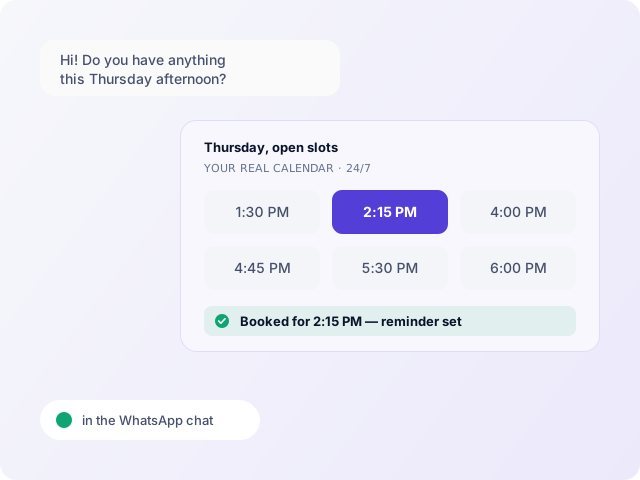
Booking Intent Is Easy to Lose Before the Appointment Is Confirmed
-
High-Intent Enquiries Wait Too Long to Book
Customers who are ready to act can still sit in a queue until someone is available to answer questions or coordinate the appointment.
-
Teams Waste Time Coordinating Routine Appointments
Collecting details, checking options, confirming times and handling changes creates repetitive work that pulls teams away from higher-value conversations.
-
Booking Links Fail When Questions Come First
A calendar link only works when the customer already knows what they need. Many enquiries still need qualification, clarification or reassurance before they are ready to choose a time.
-
After-Hours and Delayed Enquiries Become Lost Bookings
Every gap between “I want to book” and a clear next step gives the customer more time to lose momentum or choose another provider.




From Booking Intent to a Confirmed Next Step
Turn Booking Intent Into the Right Appointment Action
Qualify Before Booking
Collect the configured details that determine what the customer needs before presenting the appropriate booking step.
Find the Right Booking Path
Connect the conversation to the relevant AI appointment scheduling or configured booking workflow and available scheduling information.
Book, Reschedule or Change the Appointment
Keep common appointment actions inside the customer journey where the configured scheduling workflow supports them.
Confirm and Continue the Journey
Continue into the relevant confirmation, reminder, follow-up or recovery workflow instead of ending at the calendar step.
More Than an AI Appointment Setter or Calendar Link

One AI agent for every industry
Your key customer conversations, handled end to end by ZINQ.
Turn product interest into booked conversations
Use appointment booking for product consultations, assisted shopping, high-value purchases or other conversations where a customer needs time with your team.
- Offer consultation times
- Qualify the request
- Confirm inside chat
- Send reminders
- Consultation , offers available times
- Qualification , captures buying needs
- Booking , confirms the slot
- Reminder , follows up before the meeting
- Handoff , brings in the right person
Fill your appointment calendar without phone tag
Patients can ask questions, provide intake details and move toward an available appointment in the same conversation.
- Consultation booking
- Administrative intake
- Rescheduling
- Appointment reminders
- Intake
- Scheduling
- Reminder
- Rescheduling
- Staff Handoff
Move property enquiries straight to viewings
Turn listing interest into scheduled property visits while the buyer is still engaged.
- Capture property interest
- Check viewing availability
- Confirm viewing
- Send visit details
- Listing Enquiry
- Qualification
- Viewing
- Reminder
- Sales Handoff
Book advisor conversations while intent is high
Move qualified policy enquiries toward an available advisor instead of adding another callback request.
- Capture policy need
- Qualify before booking
- Schedule advisor time
- Send reminders
- Enquiry
- Qualification
- Advisor Booking
- Reminder
- Handoff
Turn travel enquiries into confirmed reservations and calls
Use conversational scheduling where a traveller needs a reservation, consultation or coordinated service.
- Capture requirements
- Offer availability
- Confirm in chat
- Send pre-arrival communication
- Enquiry
- Reservation
- Coordination
- Reminder
- Concierge Handoff
Turn vehicle interest into showroom visits
Move a buyer from a model enquiry to a confirmed test drive without manual coordination.
- Capture vehicle interest
- Qualify needs
- Offer test-drive slots
- Confirm and remind
- Vehicle Enquiry
- Qualification
- Test Drive
- Reminder
- Sales Handoff
Make advisor appointments easier to reach
Move relevant customer enquiries toward available advisor time after the required details have been collected.
- Capture service need
- Collect required details
- Schedule advisor
- Send reminders
- Product Enquiry
- Qualification
- Advisor Booking
- Reminder
- Staff Handoff
Turn product interest into booked demos
Move prospects from product questions to a confirmed demo or onboarding session inside the same conversation.
- Capture company requirements
- Qualify intent
- Offer demo availability
- Confirm and remind
- Product Enquiry
- Qualification
- Demo Booking
- Reminder
- Sales Handoff
Conversations are just the beginning
AI Agents, Knowledge Base, CRM, Workflows, Analytics and more, all in one platform. Everything your team needs to own the customer conversation, end to end.
Connect Everything You Already Use
Connect calendars, customer records and communication channels so availability, confirmed appointments and booking context move into the systems your team already uses.






Appointment Booking FAQs
Book a demoAI appointment booking uses an AI-led conversation to collect relevant information and move a customer into a configured appointment or scheduling workflow.
Yes. ZinQ can connect supported conversations with configured appointment scheduling workflows and available scheduling information.
Yes. The AI agent can use approved business knowledge to handle supported questions before the booking step.
Yes. Your workflow can define the questions and information that need to be collected before the booking moves forward.
Where rescheduling is part of the configured booking workflow, ZinQ can help the customer move towards another appropriate time.
Configured confirmation, follow-up, reminders, rescheduling and no-show recovery workflows can continue from the booked appointment.
Turn Ready-to-Book Enquiries Into Real Appointment Progress
Answer the questions, remove the back-and-forth and move customers into the right booking path while intent is still active.
Book a Demo