Omnichannel Chatbot for Connected Customer Conversations
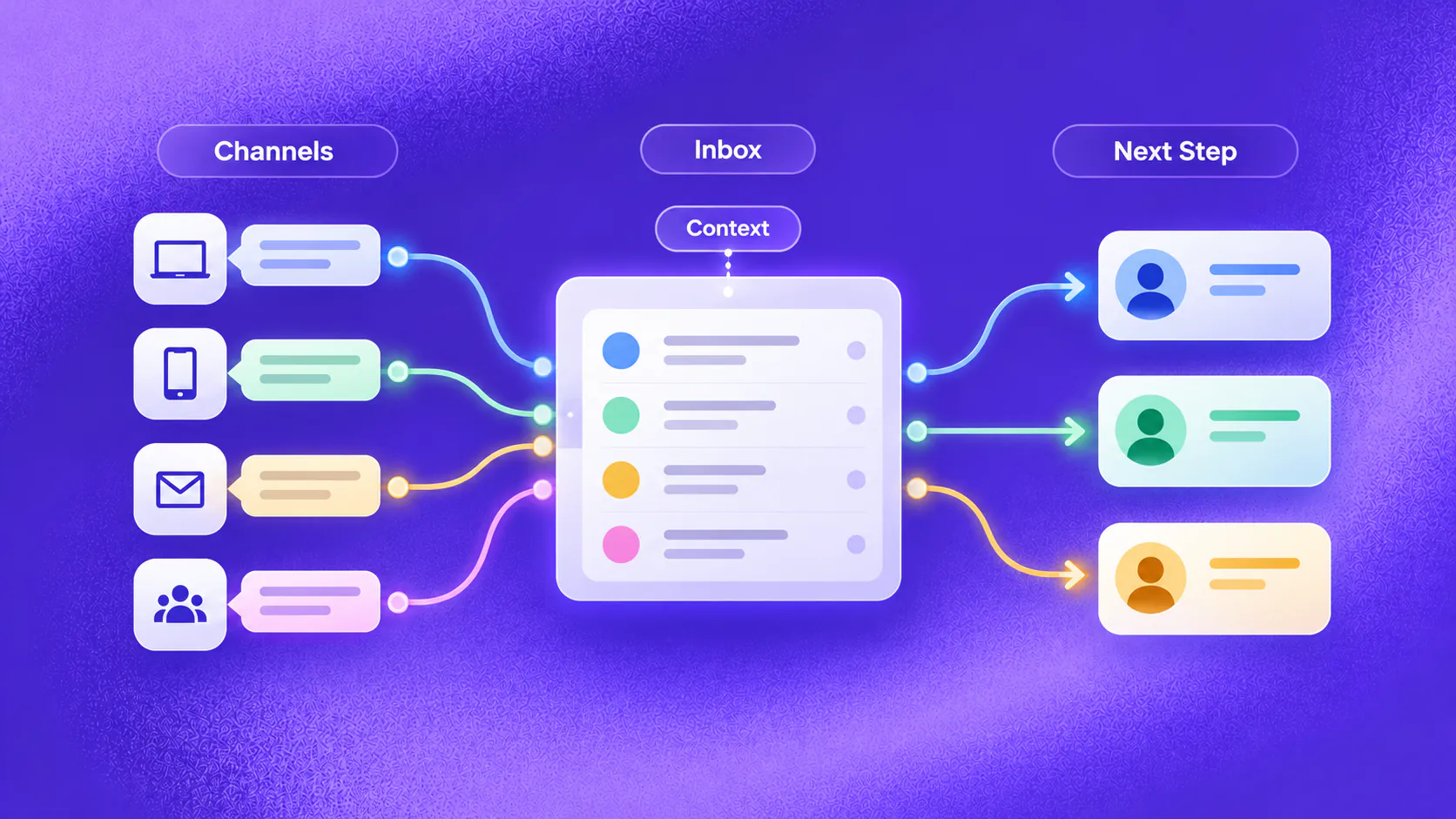
An omnichannel chatbot helps a business respond consistently across supported channels while preserving contact context, conversation history, ownership and the next action in one working system. It should not merge people solely because details look similar, and channel rules, consent, identity and human responsibility still apply.
Key takeaways
- Omnichannel means connected context and ownership across supported channels, not sending the same reply everywhere.
- Preserve channel source, consent, identity state, conversation history and next action when a customer changes channels.
- Use a shared inbox, assignments and durable tasks so customer work has a visible owner.
- Measure repeated questions, duplicate work, missed conversations and handoff quality rather than channel volume alone.
What is an omnichannel chatbot?
An omnichannel chatbot helps a business respond across supported customer channels while keeping the relevant contact context, conversation history, ownership and next action visible in one working system.
It does not mean copying one script into every channel. WhatsApp, Instagram, web chat, Telegram and email have different message formats, permissions, timing expectations and customer behaviour. The operating goal is continuity, not uniformity.
Consider an illustrative prospect who asks a product question on Instagram, later visits the website and then continues on WhatsApp. A connected experience helps the team understand the source and previous context. It should not assume that similar contact details prove identity without an appropriate matching rule.
Related must-read articles
Why do multichannel conversations become fragmented?
Businesses often add channels one at a time. Marketing monitors social messages, sales watches website leads, service manages email and another team owns WhatsApp. The customer sees one business, but the teams see separate queues.
Common friction includes:
- The same enquiry receiving different answers
- Messages missed in channel-specific inboxes
- Duplicate records created for one contact
- Customers repeating their goal after switching channels
- Sales and service competing for the same conversation
- Follow-up continuing after staff ownership
- Opt-outs not reaching the responsible workflow
- Managers unable to see the current next action
- Channel volume reported without customer outcomes
An omnichannel chatbot should reduce this fragmentation by preserving context and ownership without erasing the controls that each channel requires.
What context should travel with a conversation?
Carry only the information needed to continue safely and usefully. Relevant context may include:
- Channel and source
- Contact details supplied with permission
- Stated goal or intent
- Approved answers already provided
- Information already collected
- Current journey stage
- Assigned owner or queue
- Open task or requested next step
- Consent and opt-out state
- Identity or authorization state where relevant
The omnichannel chatbot should not expose protected information merely because a customer moved from one channel to another. Identity controls remain necessary for account-specific conversations.
How should contact recognition work?
Contact recognition can reduce repeated questions, but incorrect merging creates privacy and service risk. Use reliable identifiers and explicit business rules. A matching phone number, email address or verified account may provide context when permitted; a similar name is not enough.
Keep channel conversations visible in one inbox while preserving their source. If identity is uncertain, treat the records separately until a person or approved verification step resolves the match.
The contacts capability provides the product context for customer records. It should not be described as automatically linking every message from one person without evidence.
How does the journey continue across channels?
The conversation should resume from a meaningful state instead of replaying the opening script. If a prospect already supplied a use case on web chat, a later WhatsApp message should not demand the same explanation when the contact and permission are appropriately matched.
An omnichannel chatbot may continue journeys such as:
- Product enquiry to sales qualification
- Social enquiry to website discovery
- Website question to WhatsApp follow-up
- Appointment request to confirmation and reminder
- Purchase enquiry to order support
- Service request to ticket and staff resolution
The next message must still suit the destination channel. An email-length explanation may be unsuitable for chat, and a promotional WhatsApp template may require prior approval and consent.
How does a shared inbox change team work?
A shared inbox gives sales, marketing, service and operations one place to see supported channel conversations, assignments and ownership. The value is not simply visibility. It is the ability to prevent missed or duplicated work.
Useful operating states include:
- New and unassigned
- Assigned and in progress
- Waiting for customer
- Waiting for an internal action
- Transferred to another team
- Resolved or closed
- Failed and needing recovery
The omnichannel chatbot can collect context and trigger a configured route. A person or queue still needs to own exceptions. The omnichannel inbox and tickets and tasks provide the supporting operating model.
How should sales and service journeys be separated?
A new-business enquiry and an existing-customer problem may arrive through the same channel. Ask the minimum question needed to identify the journey and route it correctly.
For example, an illustrative customer may write, “I need help with my booking.” That could mean making a new booking, changing an existing one or reporting a service problem. The omnichannel chatbot should clarify the goal before collecting details or sending a sales response.
Sales paths may capture intent, qualification and desired next steps. Service paths may require verification, status information, troubleshooting intake or an owned task. Do not force a customer with an urgent service problem through lead qualification.
How should campaigns and broadcasts fit?
First-party broadcasts and follow-up should respect the customer’s channel permission, segment, journey stage, frequency and opt-out state. A person who completed a purchase should not continue receiving abandoned-journey reminders.
The omnichannel chatbot may handle replies to a permitted broadcast, identify intent and route the response. It does not create or manage paid advertising on Google, Meta or another network. Its role begins when an enquiry reaches the business or when the business contacts an eligible person already in its first-party data.
Use the campaigns and segments capability for governed outreach and reply handling.
When should a person step in?
Transfer when the customer asks, identity is uncertain, the request crosses an action limit, a complaint or sensitive issue appears, conflicting records exist, a connected action fails or professional judgment is required.
Provide the receiving person with:
- Current channel and source
- Known contact context
- Customer’s stated goal
- Conversation history relevant to the request
- Information already collected
- Ownership and workflow state
- Actions attempted and failures
- Requested next step
The human handoff capability should preserve context without granting broader access than the receiving person needs.
What channel rules still apply?
Each channel retains its own requirements. These may include message windows, approved templates, sender rules, consent, delivery states, available media and opt-out handling.
An omnichannel chatbot cannot make those differences disappear. Instead, the implementation should maintain one operating view while choosing an appropriate message and action for each channel.
Also define what happens when a channel is unavailable, a message fails, a customer replies from a new number or a contact requests deletion. Failure recovery and data governance are part of the experience.
How do you measure omnichannel value?
Measure continuity and ownership, not only message counts:
- Conversations assigned to the correct team
- Customers asked to repeat information
- Duplicate or conflicting records
- Missed and unassigned conversations
- Time waiting for an owner
- Transfers received with usable context
- Open tasks after the chat ends
- Follow-up stopped after completion or opt-out
- Channel delivery and reply outcomes
- Unanswered questions and workflow failures
The analytics layer can support configured reporting. Do not claim a single customer view or cross-channel attribution beyond what identity and source data can verify.
How should you roll it out?
Start with two channels and one journey where fragmentation is visible. Map the source, contact rules, information collected, owner, next action, handoff and closure state. Test the same customer goal arriving through each channel.
Review duplicate conversations, failed matching, conflicting consent, after-hours messages, staff transfers and channel delivery failures. Assign owners for knowledge, routing, contact data and channel compliance.
Expand only after the omnichannel chatbot preserves context without hiding uncertainty. A connected operating model is more valuable than adding channels faster than the team can own them.
What should teams test before adding another channel?
Use one realistic customer goal and send it through every supported entry point. Check whether the source remains visible, the contact rule works, the correct team receives the conversation and the customer can continue without repeating information.
Test the omnichannel chatbot with:
- The same enquiry arriving through two channels
- Similar contact details belonging to different people
- A customer changing channels after staff assignment
- An opt-out received on a different channel
- A website visitor with no persistent identity
- A failed outbound message followed by an inbound reply
- A service request arriving during a sales follow-up
- A task that remains open after the chat closes
Review these tests with marketing, sales, service, operations and data owners. The omnichannel chatbot should expose uncertainty instead of merging records or advancing a workflow without sufficient evidence.
Create a channel-change checklist covering consent, templates, message windows, identity, delivery states, routing and failure recovery. Retest the omnichannel chatbot whenever one of those rules changes.
Finally, compare customer outcomes before adding another channel. If the omnichannel chatbot still leaves conversations unassigned or causes customers to repeat themselves, more channel coverage will multiply the problem. Strengthen ownership and context first, then extend the omnichannel chatbot to the next supported surface.
Additional resources
Frequently asked questions
What is an omnichannel chatbot?
It is a conversational system that supports several channels while carrying appropriate contact context, history, ownership and workflow state into one operating view.
Does omnichannel mean every conversation is automatically merged?
No. Contact matching requires reliable identifiers, consent and identity controls. Similar names or phone numbers are not sufficient proof that two conversations belong to one person.
Which channels can be connected?
The answer depends on the implementation. ZINQ supports customer operations across WhatsApp, Instagram, web chat, Telegram and email, with each channel retaining its own rules and capabilities.
Conclusion
An omnichannel chatbot is valuable when customers can change supported channels without losing context and teams can see who owns the next action.
READY TO SEE ZINQ IN ACTION?
From first enquiry to conversion, follow-up and support, ZINQ helps automate the next step while keeping your team in control.
Book a DemoAdditional resources
-
What Is a Chatbot? Business Uses and Examples
A chatbot is software that holds a text or voice conversation with a person. Businesses use one to answer common questions, collect information, guide a customer through a defined task and bring in a person when the request needs judgment.
The ZINQ team · October 30, 2026 · Comparisons & Guides -
WhatsApp Chatbot for Customer Enquiries and Follow-Up
A WhatsApp chatbot can engage an enquiry after the person starts a WhatsApp conversation, answer approved questions, collect details that affect the next step, support booking or checkout, follow up where permitted and transfer exceptions with context. It does not create or manage the advertising campaign that generated the enquiry.
The ZINQ team · October 30, 2026 · WhatsApp for Business -
Website Chatbot for Lead Capture and Customer Support
A website chatbot can respond while a visitor is evaluating a page, answer approved questions, use page context to understand likely intent, collect details that affect the next step and move the conversation towards booking, checkout, support or a person.
The ZINQ team · October 30, 2026 · AI Chatbots