Customer operations AI agent: what it owns across support, sales and follow-up
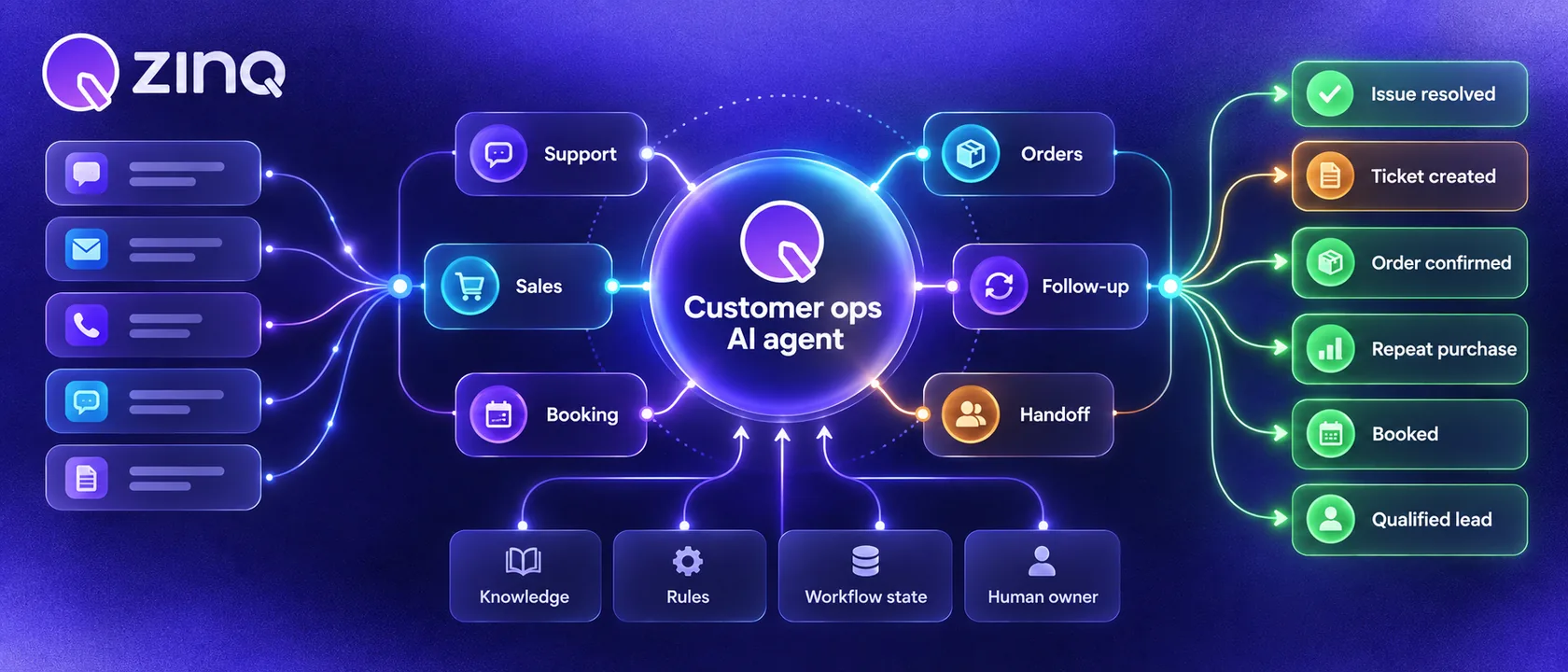
A customer operations AI agent helps manage repeatable customer work across sales, support, booking, follow-up and handoff by connecting conversations to approved knowledge and business workflows.
Key takeaways
- Customer operations is the work behind the message: qualify, book, route, follow up and hand off.
- A customer operations AI agent needs knowledge, channels, workflow state and human ownership.
- Start with one customer workflow that has clear inputs, rules and escalation paths.
- Measure completed customer outcomes, not only faster replies.
What customer operations means
Customer operations is the work that happens after a customer sends a message. Someone has to answer, qualify, book, route, update, follow up or hand off. In small teams, that work often sits across sales, support and operations. In growing teams, it gets split across inboxes, spreadsheets, CRMs, calendars and helpdesks.
A customer operations AI agent helps with that repeatable work. It should not only respond to messages. It should understand the customer’s goal, use approved knowledge, ask for missing details and move the request to the next safe step.
This is different from treating automation as a chat widget. A customer may enter through WhatsApp, Instagram, web chat or email. The business still needs one operating model behind those channels.
What a customer operations AI agent owns
A customer operations AI agent can own a defined part of the customer journey. It may cover first response, lead qualification, appointment booking, order questions, support triage, follow-up and human handoff.
The agent should have four things:
- approved knowledge it may use
- channel access where customers actually write
- workflow rules for the next step
- a human owner when the request leaves scope
Without those pieces, the agent becomes a polite AI chatbot with no operational responsibility. It may answer nicely, but the team still has to chase the real work later.
Where it differs from a basic chatbot
Many businesses start by searching for AI chatbot for business, customer support chatbot or website chatbot. Those terms are useful because they describe the visible interface. The customer sees a conversation.
The difference is what happens after the message.
| Question | Chatbot view | Customer operations agent view |
|---|---|---|
| What is the job? | Reply to the customer | Complete the next operational step |
| What does it need? | FAQ or script | Knowledge, workflow rules and system context |
| What happens after an answer? | Customer decides what to do | Agent books, routes, follows up or hands off |
| Who owns exceptions? | Often unclear | Named team, queue or person |
| What gets measured? | Chats, replies and deflection | Completed outcomes and handoff quality |
If the business still needs a person to copy details from the chat into another tool, the workflow is unfinished.
Good first workflows
The first workflow should be frequent, clear and safe to review. Do not start with the most complicated customer case.
Good starting points include:
- Lead qualification for new enquiries.
- Appointment booking where rules are clear.
- Support triage for common request types.
- Follow-up after a missed response.
- Human handoff with a structured summary.
Each workflow should have an owner. If nobody owns the queue after the agent hands off, the automation will only make the delay more visible.
A practical example
Imagine a customer asks a service business on WhatsApp whether a specific appointment is available. A basic chatbot might answer with business hours or a booking link. A customer operations AI agent can do more.
It can ask what service the customer needs, check which information is required, confirm location or timing, suggest the next step and hand the conversation to the right person if the request does not fit the rules. If the customer stops replying, it can send a follow-up. If the customer replies, the follow-up should stop.
That is why workflow automation and human handoff matter as much as the message itself. The agent needs to know when to act and when to stop.
How to design the first workflow
Start by writing the workflow as a simple operating rule.
What does the customer want? What information does the business need? Which answers are approved? What can the agent do? When must a person take over? What should the handoff include?
For a lead qualification workflow, the agent may collect need, location, timing and preferred channel. For a booking workflow, it may confirm service type, availability and contact details. For support triage, it may collect the issue, order number and urgency.
Do not add every possible edge case on day one. Add the cases that happen often enough to review.
What to measure
Message speed is useful, but it is not enough.
Track the operational result:
- qualified leads routed correctly
- appointments booked or prepared for booking
- support cases sent to the right queue
- follow-ups stopped after reply
- handoffs accepted without rework
- knowledge gaps found during review
- repeated customer contacts after an automated answer
If the agent sends many messages but customers still repeat themselves, the workflow is weak. If the agent reduces missing details before handoff, it is doing useful work.
Common failure points
The first failure point is unclear ownership. An agent can hand off only if a person, team or queue owns the next step.
The second is unsupported knowledge. Customer operations agents should answer from approved information. If the source is stale, the agent should stop or route.
The third is runaway follow-up. Follow-up automation should stop when a customer replies, books or becomes ineligible.
The fourth is treating every channel separately. A customer who starts on web chat and replies on WhatsApp should not become two unrelated customers if the business can identify the same conversation.
Conclusion
A customer operations AI agent should make customer work easier to complete, not only easier to answer. Start with one workflow, connect it to approved knowledge, define the next action and make handoff useful. Once the team trusts that loop, expand to the next customer operation.
Frequently asked questions
What is a customer operations AI agent?
It is an AI agent that helps run repeatable customer-facing work such as answering approved questions, qualifying leads, booking appointments, sending follow-ups, routing cases and preparing human handoffs.
How is it different from a chatbot?
A chatbot usually focuses on the conversation. A customer operations AI agent connects the conversation to the work that must happen next.
Which workflow should come first?
Choose a frequent workflow with a clear owner, approved source information, low risk and a visible next step. Lead qualification, booking and support triage are common starting points.
Does it replace customer operations teams?
No. It should remove repeated handoffs and missing information while keeping people responsible for exceptions, judgment and sensitive cases.
Conclusion
A customer operations AI agent is useful when it turns scattered customer messages into completed next steps. Give it one clear workflow, one owner and a handoff path before expanding.
READY TO SEE ZINQ IN ACTION?
From first enquiry to conversion, follow-up and support, ZINQ helps automate the next step while keeping your team in control.
Book a DemoRelated articles
-
AI customer service: an operating guide for support teams
AI customer service uses AI to assist, answer, retrieve, act or route within a support workflow. Operate it by assigning owners, defining request-level authority, maintaining knowledge and integrations, testing changes, reviewing failures and measuring the customer's completed outcome.
Kushal Verma · June 8, 2026 · Customer Support & CX -
Customer operations workflow automation: practical guide
Automate a customer-operations workflow by defining its trigger, required context, decision rules, permitted actions, system evidence, exception paths and owner. Start with a bounded request, test partial failures and measure the completed customer outcome before adding more autonomy.
The ZINQ team · September 21, 2026 · Workflows & Automation -
Linking customer conversations safely across channels
Linking conversations across channels requires reliable identity evidence and appropriate access controls. A mistaken merge can reveal another customer's information, so uncertain matches need a review or verification path.
The ZINQ team · June 5, 2026 · Omnichannel