AI agent platform for customer support operations
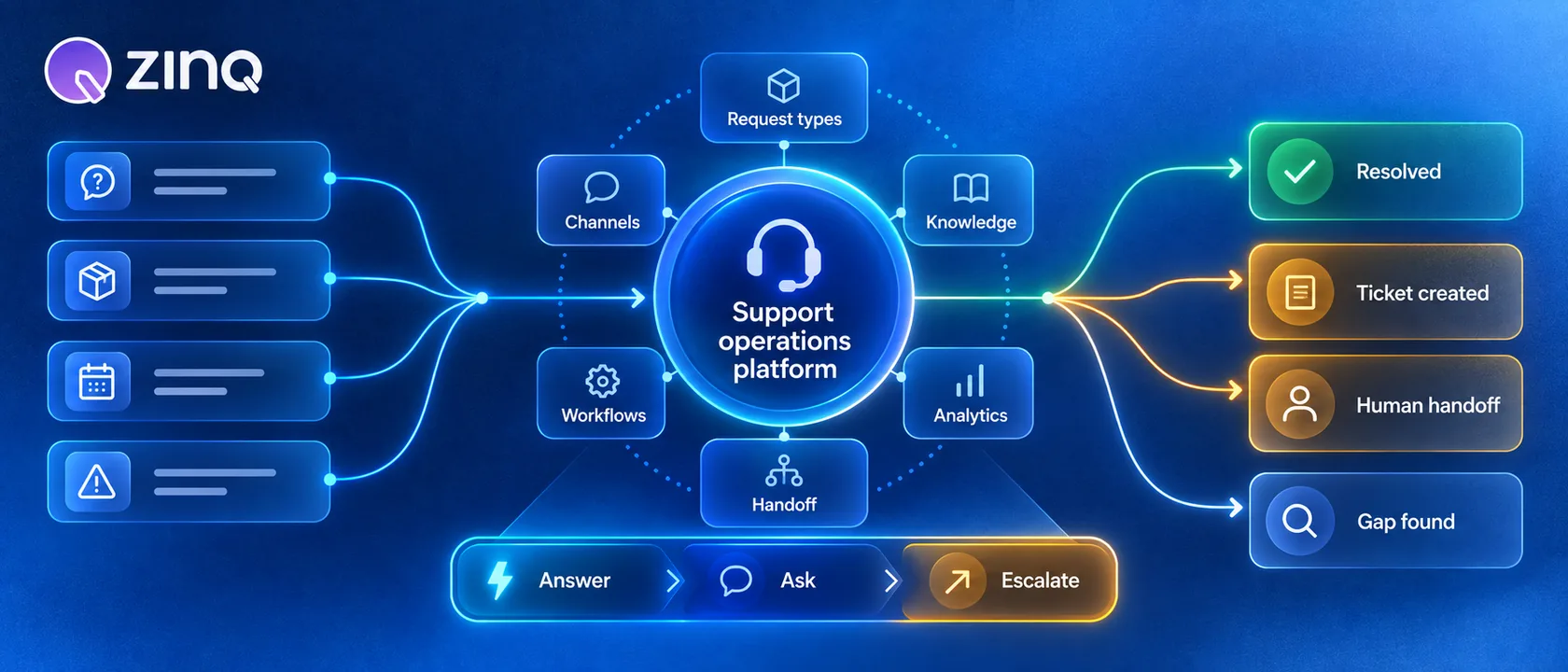
An AI agent platform for customer support operations connects conversations, knowledge, workflows, channels and human handoff so support teams can resolve repeatable requests without losing control of exceptions.
Key takeaways
- A support AI agent platform should connect customer conversations to owned support workflows, not only generate replies.
- The platform needs approved knowledge, channel coverage, workflow actions, human handoff and reporting in one operating model.
- The safest rollout starts with request types, authority levels and exception rules before expanding automation.
- Useful reporting tracks completed outcomes, handoffs, knowledge gaps and repeat contacts.
What support operations need from an AI agent platform
Support teams do not only need faster replies. They need a way to turn repeated customer messages into completed work while keeping exceptions visible.
An AI agent platform for customer support operations should connect the public conversation to the internal process. That includes the channel where the customer wrote, the approved knowledge the answer comes from, the workflow action that follows, the person who owns an exception and the report that shows what happened.
This is the difference between buying a customer support chatbot and operating an AI support workflow. The first can answer. The second can help the team run support with less manual repetition.
The core platform pieces
A useful platform has several parts working together.
| Platform area | What it should do | Why it matters |
|---|---|---|
| Channels | Bring WhatsApp, web chat, Instagram, email and other conversations into one operating view | Customers do not choose the channel that is easiest for your team |
| Knowledge | Use approved answers, policy details and business context | The agent should not improvise unsupported answers |
| Workflows | Collect details, trigger permitted actions and record the next step | A reply without action often pushes work back to staff |
| Handoff | Route exceptions with context and reason | People should not restart the conversation from zero |
| Analytics | Show outcomes, gaps, handoffs and repeated failures | Teams need to improve the workflow, not admire message volume |
ZINQ’s platform follows this operating model across agents, knowledge, workflows, omnichannel inbox and analytics.
Start with request types, not features
The cleanest support rollout begins with request types. List the ten most common customer messages and score each one by frequency, consequence, knowledge source, required action and exception rate.
That exercise usually reveals a few safe first workflows. For example:
- “Where is my order?”
- “Can I reschedule my appointment?”
- “What documents do I need?”
- “What are your support hours?”
- “Can someone call me back?”
Each request needs a defined result. “Answered” is not specific enough. A better result is “customer received the approved policy link,” “booking change request was collected,” or “case routed to billing with account details and reason.”
Define authority before automation
Authority is the set of actions the agent may take without a person. It is the guardrail that keeps support automation useful.
For a low-risk FAQ, the agent may answer directly from approved knowledge. For a booking change, it may collect details and propose next steps. For a refund, medical question, payment issue or angry customer, it may gather context and hand off.
Do not make authority vague. Write it as rules:
- The agent may answer only from approved knowledge.
- The agent may ask for missing order or booking details.
- The agent may create a support task for the team.
- The agent must hand off complaints, sensitive data requests and policy exceptions.
These rules help both the AI and the humans. Staff know what the agent was supposed to do, and managers know what to review.
Connect channels without losing context
Support operations get messy when customer history is split across channels. A customer may ask on WhatsApp, follow up on email and then use web chat the next day.
An AI agent platform should help the team recognize the customer or at least preserve the conversation state where appropriate. The goal is not to merge data recklessly. The goal is to avoid making customers repeat details the business already has.
For teams handling messages across channels, the channels layer matters. WhatsApp, Instagram, web chat, Telegram, email and voice may all start a support request. The platform should make it easier to see the request, its source and its current owner.
Use handoff as a designed step
Human handoff should not feel like the agent failed. It is the correct path for work that needs judgment.
A useful handoff includes:
- the customer’s original request;
- the details already collected;
- the knowledge article or rule used;
- the reason for handoff;
- the suggested next owner or queue;
- the conversation history.
This is why human handoff belongs in the platform design, not as a panic button added later.
Measure completed support outcomes
Support AI reporting can go wrong when it only counts deflection or response speed. Fast answers are useful, but they do not prove the customer got what they needed.
Track the outcome of each request type. Useful measures include first-contact resolution, reopened cases, unanswered questions, handoff rate, handoff quality, repeat contact, time to human response and knowledge gaps.
The platform should also show the work created by automation. If the agent collects booking changes but staff still process them later, that is fine as long as the task, owner and next step are visible.
A practical rollout plan
Start with one request family. Build the knowledge, define the authority, decide the handoff route and test examples before opening the workflow to all traffic.
After launch, review real conversations. Look for unsupported answers, repeated missing details, confusing instructions, unnecessary handoffs and cases where a human had to redo the agent’s work.
Then expand. Add related questions, one connected action or one additional channel at a time. This keeps the platform tied to support outcomes instead of becoming a pile of disconnected automation.
Frequently asked questions
What is an AI agent platform for customer support operations?
It is a system that helps support teams run customer conversations across channels, use approved knowledge, automate permitted workflow steps, route exceptions and review performance.
How is it different from a support chatbot?
A support chatbot usually focuses on answering messages. A support AI agent platform also manages the surrounding operation: knowledge, channels, routing, handoff, workflow actions, analytics and team ownership.
Which support requests should be automated first?
Choose frequent requests with clear source information, low consequence, a known owner and an observable result. Order status, appointment changes, basic policy questions and intake triage are common examples.
Does a support AI agent platform replace agents?
No. It should reduce repetitive handling and prepare cleaner handoffs. People still own exceptions, policy decisions, sensitive cases, angry customers, quality review and workflow improvements.
Conclusion
Treat the platform as support infrastructure, not a single chatbot. Define request types, connect trusted knowledge, limit authority, measure completed outcomes and use handoff data to improve the next version of the workflow.
READY TO SEE ZINQ IN ACTION?
From first enquiry to conversion, follow-up and support, ZINQ helps automate the next step while keeping your team in control.
Book a DemoRelated articles
-
AI customer service: an operating guide for support teams
AI customer service uses AI to assist, answer, retrieve, act or route within a support workflow. Operate it by assigning owners, defining request-level authority, maintaining knowledge and integrations, testing changes, reviewing failures and measuring the customer's completed outcome.
Kushal Verma · June 8, 2026 · Customer Support & CX -
Customer service automation examples with exception handling
Useful customer service automation examples include the exception path, not only the successful reply. For every automated answer or action, define what happens when information is missing, identity fails, a system is unavailable, policy requires judgment or the customer asks for a person.
The ZINQ team · September 21, 2026 · Workflows & Automation -
Managing WhatsApp and web chat in one support operation
WhatsApp and web chat can share a support operation while retaining different identity, messaging and follow-up rules. Define queue ownership and supported contact association rather than assuming that every conversation automatically becomes one customer history.
Pavan · June 30, 2026 · Omnichannel